Daviplata
This guide provides instructions for Daviplata payments, including request examples, push notification handling, and webhook processing.
Requirements
Before integrating Daviplata you need to:
- Generate an access token through the Authentication endpoint.
- Configure a public HTTPS
callback_urlthat receives status updates after customers leave the Daviplata interface.
Important: Daviplata is only available in Colombia and expects COP currency. Contact your Account Manager to enable this payment method for your seller account.

Use Cases Specifics
When integrating any Getnet solution, market-specific requirements apply. Daviplata is only available in Colombia and only for COP currency. To know more about the specific requirements of Colombia, be sure to review the resources below before you go live:
You can also use test cards to simulate specific scenarios.
Characteristics
The table below summarizes the shared behavior and requirements for Davilplata payments.
| Capability | Details |
|---|---|
| Customer interaction | Push notification sent to customer's mobile device via Daviplata app |
| Confirmation | Asynchronous: initial PENDING status, then APPROVED or DECLINED via webhook |
| Notifications | Webhooks for asynchronous status updates when customer approves/declines |
callback_url.Available features
Use the matrix below to confirm the scenarios currently supported for Daviplata.
| Payment flow | Supported countries | Purchases | Refunds | Partial refunds | Multiple refunds | Pre-authorizations |
|---|---|---|---|---|---|---|
| Wallet | Colombia | ✅ | ❌ | ❌ | ❌ | ❌ |
Payment flow
This section guides you through the complete process of implementing Daviplata payments, from collecting customer information to generating the payment reference and handling the payment confirmation. The diagram below provides an overview of the Daviplata payment process:

1. Create the payment request
Call the Create – Authorize endpoint with the attributes below.
The table outlines the minimum fields required for Daviplata payment.
| Attribute | Description | Required value |
|---|---|---|
payment_method | Wallet payment method | WALLET |
brand | Brand's identifier | DAVIPLATA |
callback_url | Where status updates are sent | Your HTTPS endpoint |
amount | Transaction amount in cents | Integer (e.g. 5000 for €50.00) |
currency | ISO currency code | COP |
order_id | Merchant reference for reconciliation | Unique string |
The transaction is routed to the APM (Daviplata) flow automatically when the fieldbrand = daviplatais present.
The following sample request shows how to initialize an Daviplata payment.
curl --location --request POST 'https://api.pre.globalgetnet.com/dpm/payments-gwproxy/v2/payments' \
--header 'Content-Type: application/json'
--header 'authorization: Bearer <your-token>'
--header 'Cookie: route=1764158520.87.3759.130009|e49df8139f6f4c7e96e90a70274c2867' \
--data '{
    "idempotency_key": "78b74259-70b6-4fcb-aece-f240b96f2698",
    "request_id": "198317fb-d931-4fda-9b79-e5ff7929f5c7",
    "order_id": "35541357001",
    "data": {
        "amount": 10000000,
        "currency": "COP",
        "customer_id": "c1015cbb-fa91-48f7-b63f-d05bceceda91",
        "payment": {
            "payment_id": "962cec20-9d7f-409f-9dd2-4578d69fe98c",
            "payment_method": "WALLET_PUSH",
            "brand": "DAVIPLATA",
            "soft_descriptor": "DAVIPLATA TESTE"
        },
        "additional_data": {
            "customer": {
                "customer_id": "123123",
                "email": "jose.silva@email.net",
                "document_number": "50506468",
                "document_type": "SE_NIT",
                "name": "Jose da Silva",
                "phone_number": "34700000000",
                "billing_address": {
                    "street": "R a",
                    "number": "1",
                    "district": "B",
                    "city": "City Z",
                    "state": "SP",
                    "country": "CO",
                    "postal_code": "05781000",
                    "complement": "N/A"
                }
            },
            "order": {
                "items": [
                    {
                        "name": "Item2",
                        "quantity": 1,
                        "sku": "sku1",
                        "price": 10000
                    }
                ]
            }
        }
    }
}'curl --location --request POST 'https://api.pre.globalgetnet.com/dpm/payments-gwproxy/v2/payments' \
--header 'Content-Type: application/json'
--header 'authorization: Bearer <your-token>'
--header 'Cookie: route=1764158520.87.3759.130009|e49df8139f6f4c7e96e90a70274c2867' \
--data '{
"idempotency_key": "78b74259-70b6-4fcb-aece-f240b96f2698",
"request_id": "198317fb-d931-4fda-9b79-e5ff7929f5c7",
"order_id": "35541357001",
"data": {
"amount": 10000000,
"currency": "COP",
"customer_id": "c1015cbb-fa91-48f7-b63f-d05bceceda91",
"payment": {
"payment_id": "962cec20-9d7f-409f-9dd2-4578d69fe98c",
"payment_method": "WALLET_PUSH",
"brand": "DAVIPLATA",
"soft_descriptor": "DAVIPLATA TESTE"
},
"additional_data": {
"customer": {
"customer_id": "123123",
"email": "jose.silva@email.net",
"document_number": "50506468",
"document_type": "SE_NIT",
"name": "Jose da Silva",
"phone_number": "34700000000",
"billing_address": {
"street": "R a",
"number": "1",
"district": "B",
"city": "City Z",
"state": "SP",
"country": "CO",
"postal_code": "05781000",
"complement": "N/A"
}
},
"order": {
"items": [
{
"name": "Item2",
"quantity": 1,
"sku": "sku1",
"price": 10000
}
]
}
}
}
}'redirect_url, which must be used to redirect the customer to Daviplata.
The transaction is immediately stored as pending in Getnet. The final payment result is applied only after receiving the webhook callback.{
"idempotency_key": "be278973-35eb-4c45-8619-2800d62b33b6",
"seller_id": "2ab3e585-3607-467e-b2e8-420fcd45f48e",
"payment_id": "772f951479c6514b1d9c4e8fd4808fe6",
"order_id": "ORDER-10187383",
"amount": "5000",
"currency": "COP",
"status": "PENDING",
"payment_method": "DAVIPLATA",
"received_at": "2025-11-11T11:51:54.569Z",
"redirect_url": "https://daviplata.nuvei.com/checkout?reference=XYZ123",
"transaction_id": "772f951479c6514b1d9c4e8fd4808fe6",
"reason_code": "00",
"reason_message": "Waiting for customer approval in Daviplata app."
}{
"idempotency_key": "be278973-35eb-4c45-8619-2800d62b33b6",
"seller_id": "2ab3e585-3607-467e-b2e8-420fcd45f48e",
"payment_id": "772f951479c6514b1d9c4e8fd4808fe6",
"order_id": "ORDER-10187383",
"amount": "5000",
"currency": "COP",
"status": "PENDING",
"payment_method": "DAVIPLATA",
"received_at": "2025-11-11T11:51:54.569Z",
"redirect_url": "https://daviplata.nuvei.com/checkout?reference=XYZ123",
"transaction_id": "772f951479c6514b1d9c4e8fd4808fe6",
"reason_code": "00",
"reason_message": "Waiting for customer approval in Daviplata app."
}2. User Experience flow
- On the cashier screen, the customer or the merchant selects a Daviplata option.
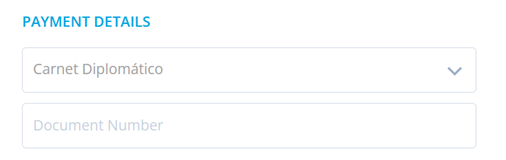
- In ‘Payment Details’, the customer selects the document type from the drop-down list and enters the document number in the ‘Document Number’ field.
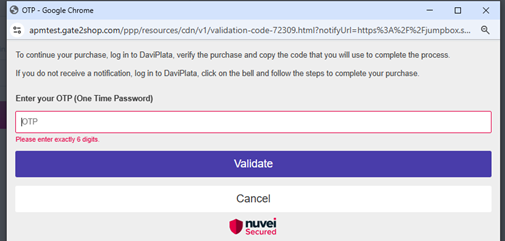
- A six digit one-time password (OTP) is sent to the mobile device of the user.
- On the page the customer is redirected to, the customer enters the OTP that was sent to the customer's mobile device and then presses ‘Validate’.
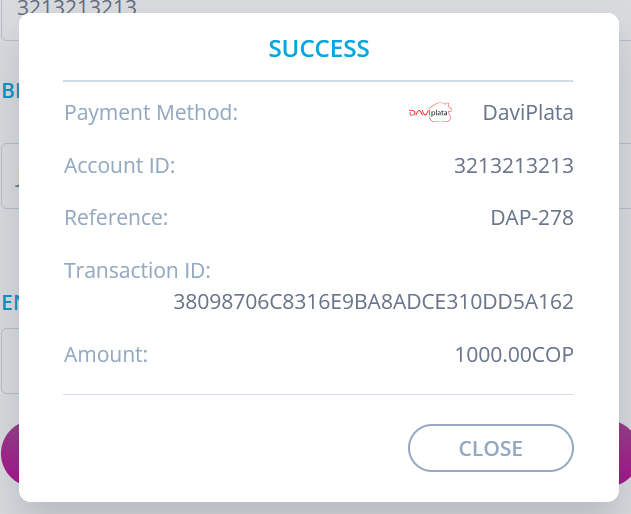
- If the transaction is completed successfully, the ‘Success’ screen is displayed.
3. Verify payment status
When the customer completes the payment, a webhook notification is sent with the updated payment status. You can also check the payment status using the Get Transaction endpoint.
Business Rules
- Only
COPcurrency is supported. - Amount must be between 99 COP and 10,000,000 COP.
- Transaction remains
pendinguntil webhook callback is processed.
Read more
- Review Authentication for token management and security best practices.
On this page