Create Recurring Payments (Subscriptions Engine)
This guide walks you through setting up recurring payments using the Getnet Subscriptions Engine. The engine automatically processes recurring charges according to subscription schedules without requiring any action from the merchant or cardholder for each transaction.
Prerequisites
Before following the steps, you need to:
- Create your account by contacting the Integration Support team to get your API credentials
client_idandclient_secret. - Generate your token with your credentials using the Access Token endpoint.
Getnet provides a Postman Collection to help you replicate these use cases locally. You can also test the API in sandbox using the API Reference available in the documentation.

Important: The Subscriptions Engine is different from Cardholder-Initiated (One Click) and Merchant-Initiated recurring payments. With the Subscriptions Engine, Getnet automatically processes all recurring charges based on the plan schedule. You don't need to trigger each payment manually.
Process overview
The Subscriptions Engine uses three main components that work together:
- Customer: The consumer of the product or service offered in the subscription.
- Plan: Defines how recurring payments will be applied, including the installment value, periodicity, and number of installments.
- Subscription: Links the customer to the plan with payment method details.
Once you create a subscription, the Getnet Subscriptions Engine automatically processes all subsequent recurring charges according to the plan schedule. The engine handles charge processing, retries, and lifecycle management automatically.
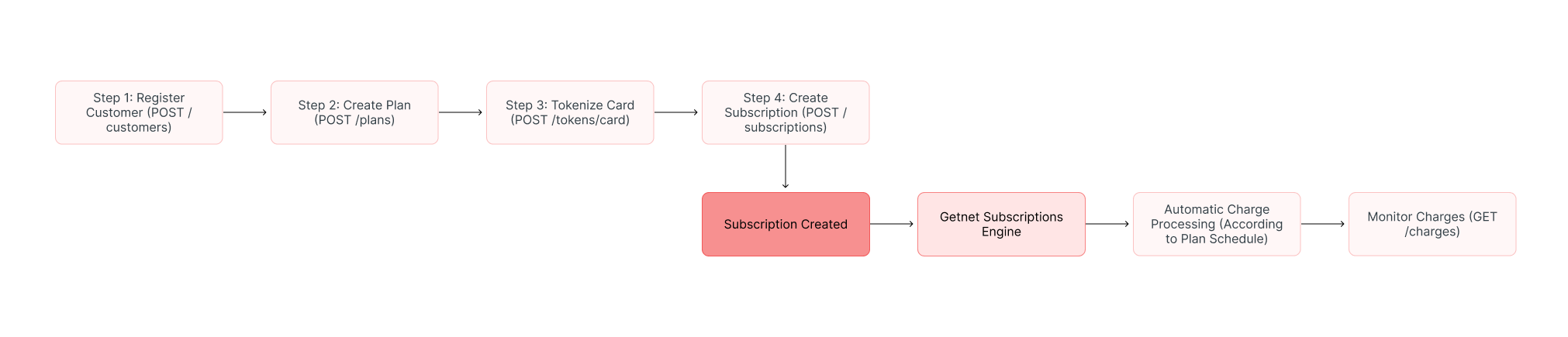
The process works as follows:
- Register a customer profile.
- Create a plan that defines the recurring payment schedule.
- Tokenize the card data to replace the raw card number with a secure token.
- Create a subscription that links the customer to the plan with payment method details.
- The engine automatically processes recurring charges according to the plan schedule.
The diagram below gives an overview of the process:
Steps
Follow these steps to set up a recurring payment subscription using the Subscriptions Engine.
Step 1: Register a customer
The Create Customer endpoint registers a customer profile in the Getnet platform. The customer represents the consumer of the product or service offered in the subscription. You need this customer ID to link them to a subscription later.
The following table describes the required fields for creating a customer:
| Field | Type | Required | Description |
|---|---|---|---|
seller_id | string (UUID) | Yes | Your merchant identifier. |
customer_id | string | No | Your custom identifier for the customer. If not provided, Getnet generates one. |
first_name | string | Yes | Customer's first name (max 40 characters). |
last_name | string | Yes | Customer's last name (max 80 characters). |
document_type | string | Yes | Customer's document type. See Document types for available values. |
document_number | string | Yes | Customer's document number without mask (11-15 characters). |
email | string | No | Customer's email address. |
phone_number | string | No | Customer's phone number without mask (max 15 characters). |
Use the Create Customer endpoint to register customer details:
curl --request POST \
  --url https://api-sbx.globalgetnet.com/dpm/customers-gwproxy/v1/customers \
  --header 'authorization: Bearer <your-token>' \
  --header 'content-type: application/json' \
  --header 'x-seller-id: 54f88e68-7764-4e87-8830-756b1e2c02f8' \
  --data '{
  "seller_id": "54f88e68-7764-4e87-8830-756b1e2c02f8",
  "customer_id": "customer-123",
  "first_name": "John",
  "last_name": "Doe",
  "email": "john.doe@example.com",
  "document_type": "CPF",
  "document_number": "12345678900",
  "phone_number": "+5511999999999"
}'curl --request POST \
--url https://api-sbx.globalgetnet.com/dpm/customers-gwproxy/v1/customers \
--header 'authorization: Bearer <your-token>' \
--header 'content-type: application/json' \
--header 'x-seller-id: 54f88e68-7764-4e87-8830-756b1e2c02f8' \
--data '{
"seller_id": "54f88e68-7764-4e87-8830-756b1e2c02f8",
"customer_id": "customer-123",
"first_name": "John",
"last_name": "Doe",
"email": "john.doe@example.com",
"document_type": "CPF",
"document_number": "12345678900",
"phone_number": "+5511999999999"
}'Example of response:
{
  "seller_id": "54f88e68-7764-4e87-8830-756b1e2c02f8",
  "customer_id": "customer-123",
  "first_name": "John",
  "last_name": "Doe",
  "email": "john.doe@example.com",
  "document_type": "CPF",
  "document_number": "12345678900",
  "phone_number": "+5511999999999",
  "created_at": "2025-11-06T10:30:00.000Z"
}{
"seller_id": "54f88e68-7764-4e87-8830-756b1e2c02f8",
"customer_id": "customer-123",
"first_name": "John",
"last_name": "Doe",
"email": "john.doe@example.com",
"document_type": "CPF",
"document_number": "12345678900",
"phone_number": "+5511999999999",
"created_at": "2025-11-06T10:30:00.000Z"
}Step 2: Create a plan
The Create Plan endpoint registers a recurrence plan that defines how recurring payments will be applied. The plan specifies the amount to charge, the billing frequency, and the number of billing cycles.
The following table describes the required fields for creating a plan:
| Field | Type | Required | Description |
|---|---|---|---|
seller_id | string (UUID) | Yes | Your merchant identifier. |
name | string | Yes | Plan name (min 3 characters). |
description | string | No | Plan description. |
amount | integer | Yes | Amount to charge in the smallest currency unit (e.g., cents). |
currency | string | Yes | Currency code (e.g., BRL, ARS, CLP, MXN). |
payment_types | array | Yes | Payment methods accepted. Values: credit_card, debit_card. |
period | object | Yes | Billing period configuration. See table below. |
product_type | string | No | Product type. Values: cash_carry, digital_content, digital_goods, gift_card, physical_goods, renew_subs, shareware, service. |
period object defines the billing frequency:| Field | Type | Required | Description |
|---|---|---|---|
period.type | string | Yes | Billing periodicity. See values below. |
period.billing_cycle | integer | Yes | Number of billing cycles (installments). |
period.type field:| Periodicity | Field: period.type | Description |
|---|---|---|
| Annual | yearly | Charges once a year |
| Monthly | monthly | Charges once a month |
| Bimonthly | bimonthly | Charges once every 2 months |
| Quarterly | quarterly | Charges once every 3 months |
| Half-yearly | semesterly | Charges once every 6 months |
| Specific | specific | Specific billing cycle in days |
Use the Create Plan endpoint:
curl --request POST \
  --url https://api-sbx.globalgetnet.com/rpy/be-plan/v1/plans \
  --header 'authorization: Bearer <your-token>' \
  --header 'content-type: application/json' \
  --header 'x-seller-id: 54f88e68-7764-4e87-8830-756b1e2c02f8' \
  --data '{
  "seller_id": "54f88e68-7764-4e87-8830-756b1e2c02f8",
  "name": "Premium Monthly Plan",
  "description": "Monthly subscription for premium features",
  "amount": 9900,
  "currency": "BRL",
  "payment_types": ["credit_card"],
  "period": {
    "type": "monthly",
    "billing_cycle": 12
  },
  "product_type": "service"
}'curl --request POST \
--url https://api-sbx.globalgetnet.com/rpy/be-plan/v1/plans \
--header 'authorization: Bearer <your-token>' \
--header 'content-type: application/json' \
--header 'x-seller-id: 54f88e68-7764-4e87-8830-756b1e2c02f8' \
--data '{
"seller_id": "54f88e68-7764-4e87-8830-756b1e2c02f8",
"name": "Premium Monthly Plan",
"description": "Monthly subscription for premium features",
"amount": 9900,
"currency": "BRL",
"payment_types": ["credit_card"],
"period": {
"type": "monthly",
"billing_cycle": 12
},
"product_type": "service"
}'Example of response:
{
  "plan_id": "51995e24-b1ae-4826-8e15-2a568a87abdd",
  "seller_id": "54f88e68-7764-4e87-8830-756b1e2c02f8",
  "name": "Premium Monthly Plan",
  "description": "Monthly subscription for premium features",
  "amount": 9900,
  "currency": "BRL",
  "payment_types": "credit_card",
  "period": {
    "type": "monthly",
    "billing_cycle": 12
  },
  "product_type": "service",
  "status": "active",
  "create_date": "2025-11-06T10:35:00.000Z"
}{
"plan_id": "51995e24-b1ae-4826-8e15-2a568a87abdd",
"seller_id": "54f88e68-7764-4e87-8830-756b1e2c02f8",
"name": "Premium Monthly Plan",
"description": "Monthly subscription for premium features",
"amount": 9900,
"currency": "BRL",
"payment_types": "credit_card",
"period": {
"type": "monthly",
"billing_cycle": 12
},
"product_type": "service",
"status": "active",
"create_date": "2025-11-06T10:35:00.000Z"
}Save theplan_idfrom the response. You will need this ID when creating the subscription in Step 4.
Step 3: Tokenize card data
The Generate Token endpoint converts a raw card number into a secure token. Tokenization replaces the actual card number with a token, ensuring PCI compliance and transaction security. The CVV is not required for token generation.
The following table describes the required fields for tokenizing a card:
| Field | Type | Required | Description |
|---|---|---|---|
card_number | string | Yes | Card number (13-19 digits). |
customer_id | string | No | Customer identifier from Step 1. |
Use the Card Tokenization endpoint to tokenize the card:
curl --request POST \
  --url https://api-sbx.globalgetnet.com/dpm/cofre-gw-proxy/v1/tokens/card \
  --header 'authorization: Bearer <your-token>' \
  --header 'content-type: application/json' \
  --header 'x-seller-id: 54f88e68-7764-4e87-8830-756b1e2c02f8' \
  --data '{
  "card_number": "5155901222280001",
  "customer_id": "customer-123"
}'curl --request POST \
--url https://api-sbx.globalgetnet.com/dpm/cofre-gw-proxy/v1/tokens/card \
--header 'authorization: Bearer <your-token>' \
--header 'content-type: application/json' \
--header 'x-seller-id: 54f88e68-7764-4e87-8830-756b1e2c02f8' \
--data '{
"card_number": "5155901222280001",
"customer_id": "customer-123"
}'Example of response:
{
  "number_token": "dfe05208b105578c070f806c80abd3af09e246827d29b866cf4ce16c205849977c9496cbf0d0234f42339937f327747075f68763537b90b31389e01231d4d13c"
}{
"number_token": "dfe05208b105578c070f806c80abd3af09e246827d29b866cf4ce16c205849977c9496cbf0d0234f42339937f327747075f68763537b90b31389e01231d4d13c"
}Save thenumber_tokenfrom the response. You will need this token when creating the subscription in Step 4.
Step 4: Create a subscription
scheduled status until the installment_start_date, when billing begins.The following table describes the required fields for creating a subscription:
| Field | Type | Required | Description |
|---|---|---|---|
seller_id | string (UUID) | Yes | Your merchant identifier. |
customer_id | string | Yes | Customer identifier from Step 1. |
plan_id | string (UUID) | Yes | Plan identifier from Step 2. |
installment_start_date | string | No | Subscription billing start date (format: YYYY-MM-DD). Until this date, the subscription remains in scheduled status. |
subscription | object | Yes | Payment method configuration. See table below. |
subscription.payment_type.credit object contains the card details:| Field | Type | Required | Description |
|---|---|---|---|
transaction_type | string | Yes | Transaction type. Use FULL for full payment. |
number_installments | integer | Yes | Number of installments per charge. |
card.number_token | string | Yes | Tokenized card number from Step 3. |
card.brand | string | Yes | Card brand. Values: VISA, MASTERCARD, AMEX, ELO, HIPERCARD. |
card.cardholder_name | string | Yes | Cardholder name as printed on the card (max 26 characters). |
card.expiration_month | string | Yes | Two-digit expiration month (e.g., 12). |
card.expiration_year | string | Yes | Two-digit expiration year (e.g., 30). |
card.security_code | string | Yes | Card security code (CVV). |
Use the Create Subscription endpoint:
curl --request POST \
  --url https://api-sbx.globalgetnet.com/rpy/be-subscription/v1/subscriptions \
  --header 'authorization: Bearer <your-token>' \
  --header 'content-type: application/json' \
  --header 'x-seller-id: 54f88e68-7764-4e87-8830-756b1e2c02f8' \
  --data '{
  "seller_id": "54f88e68-7764-4e87-8830-756b1e2c02f8",
  "customer_id": "customer-123",
  "plan_id": "51995e24-b1ae-4826-8e15-2a568a87abdd",
  "installment_start_date": "2025-11-15",
  "subscription": {
    "payment_type": {
      "credit": {
        "transaction_type": "FULL",
        "card": {
          "number_token": "dfe05208b105578c070f806c80abd3af09e246827d29b866cf4ce16c205849977c9496cbf0d0234f42339937f327747075f68763537b90b31389e01231d4d13c",
          "cardholder_name": "John Doe",
          "security_code": "123",
          "brand": "MASTERCARD",
          "expiration_month": "12",
          "expiration_year": "30"
        },
        "number_installments": 1
      }
    }
  }
}'curl --request POST \
--url https://api-sbx.globalgetnet.com/rpy/be-subscription/v1/subscriptions \
--header 'authorization: Bearer <your-token>' \
--header 'content-type: application/json' \
--header 'x-seller-id: 54f88e68-7764-4e87-8830-756b1e2c02f8' \
--data '{
"seller_id": "54f88e68-7764-4e87-8830-756b1e2c02f8",
"customer_id": "customer-123",
"plan_id": "51995e24-b1ae-4826-8e15-2a568a87abdd",
"installment_start_date": "2025-11-15",
"subscription": {
"payment_type": {
"credit": {
"transaction_type": "FULL",
"card": {
"number_token": "dfe05208b105578c070f806c80abd3af09e246827d29b866cf4ce16c205849977c9496cbf0d0234f42339937f327747075f68763537b90b31389e01231d4d13c",
"cardholder_name": "John Doe",
"security_code": "123",
"brand": "MASTERCARD",
"expiration_month": "12",
"expiration_year": "30"
},
"number_installments": 1
}
}
}
}'Example of response:
{
  "seller_id": "54f88e68-7764-4e87-8830-756b1e2c02f8",
  "order_id": "ORDER-10187383",
  "installment_start_date": "2025-11-15",
  "create_date": "2025-11-06T10:40:00.000Z",
  "payment_date": 15,
  "next_scheduled_date": "2025-11-15T00:00:00.000Z",
  "status": "created",
  "status_details": "Subscription Plan flex successfully created",
  "subscription": {
    "subscription_id": "5d740ea0-b7d1-42f5-ad64-5a5521e12345"
  },
  "customer": {
    "customer_id": "customer-123",
    "first_name": "John",
    "last_name": "Doe",
    "email": "john.doe@example.com"
  },
  "plan": {
    "plan_id": "51995e24-b1ae-4826-8e15-2a568a87abdd",
    "name": "Premium Monthly Plan",
    "amount": 9900,
    "currency": "BRL"
  }
}{
"seller_id": "54f88e68-7764-4e87-8830-756b1e2c02f8",
"order_id": "ORDER-10187383",
"installment_start_date": "2025-11-15",
"create_date": "2025-11-06T10:40:00.000Z",
"payment_date": 15,
"next_scheduled_date": "2025-11-15T00:00:00.000Z",
"status": "created",
"status_details": "Subscription Plan flex successfully created",
"subscription": {
"subscription_id": "5d740ea0-b7d1-42f5-ad64-5a5521e12345"
},
"customer": {
"customer_id": "customer-123",
"first_name": "John",
"last_name": "Doe",
"email": "john.doe@example.com"
},
"plan": {
"plan_id": "51995e24-b1ae-4826-8e15-2a568a87abdd",
"name": "Premium Monthly Plan",
"amount": 9900,
"currency": "BRL"
}
}Step 5: Monitor charges (optional)
The Get Charges endpoint retrieves a list of charges processed for a subscription. After creating the subscription, the engine automatically processes all recurring charges according to the plan schedule. Use this endpoint to monitor charge status and payment history.
Use the Get Charges endpoint:
curl --request GET \
  --url 'https://api-sbx.globalgetnet.com/rpy/be-subscription/v1/charges?subscription_id=5d740ea0-b7d1-42f5-ad64-5a5521e12345' \
  --header 'authorization: Bearer <your-token>' \
--header 'x-seller-id: 54f88e68-7764-4e87-8830-756b1e2c02f8'curl --request GET \
--url 'https://api-sbx.globalgetnet.com/rpy/be-subscription/v1/charges?subscription_id=5d740ea0-b7d1-42f5-ad64-5a5521e12345' \
--header 'authorization: Bearer <your-token>' \
--header 'x-seller-id: 54f88e68-7764-4e87-8830-756b1e2c02f8'Important considerations
- If the change request date is within the period, it will be counted from the request date + 1 day.
- Charges with scheduling that are in the retry process and had the payment denied will be disregarded in the validation of the period.
- The engine only processes charges for active subscriptions.
- The engine uses the payment method specified when creating the subscription. Ensure the card remains valid and active.
See also
- For more information about recurring payments, including availability by country and other implementation options, see Recurring Payments.
- To learn more about tokenization and secure card storage, see the Tokenization and Vault documentation.
- For complete API reference details, see the Subscriptions API and Recurrence Plans API in the Swagger documentation.
On this page