Transactions
What Is a Transaction?
A transaction represents a single payment operation processed through the GetNet Regional API. Each payment can have one or more associated transactions depending on the payment flow used. Transactions track the lifecycle of a payment from initiation through completion, including any post-sale operations such as captures, cancellations, or refunds.
Transaction types and statuses
Transactions in the GetNet Regional API are categorized by type and tracked by status throughout their lifecycle. Understanding transaction types helps you choose the right payment flow for your use case, while monitoring transaction statuses enables you to track payment progress and handle different outcomes appropriately.
Primary Transactions
Primary transactions are the initial payment operations that initiate a payment flow. These can be one of the following types:
Purchase transactions are standard sale transactions that immediately charge the customer's card:
Types of purchase transactions:
- Credit card purchase
- Debit card purchase
- Alternative payment method purchases
Authorization transactions reserve funds on the customer's payment method without immediately charging them. These funds are held until you capture the transaction, which must happen within a specific validity period.
Types of authorization transactions:
- Credit card authorization: Authorizes a credit card payment amount to be captured at a later time.
- Credit card pre-authorization: Pre-authorizes a credit card payment, typically used for scenarios where the final amount may vary.
- Alternative payment method pre-authorization: Pre-authorizes payments for alternative payment methods that support two-step payment flows.
Verification transactions validate that a payment method is valid without processing an actual charge:
- Card verification: Verifies if the customer is using a valid payment method using a zero-amount authorization
Secondary Transactions
Secondary transactions are operations that affect an existing primary transaction. These modify the final outcome of the payment:
A capture finalizes a previously authorized transaction, deducting the funds from the customer's account:
- Can be full or partial (if partial capture is supported)
- Must be performed within the authorization's validity period
- Used in two-step payment flows where authorization and capture are separated
Refunds return funds to the customer for a completed transaction. In GetNet's system, the terminology used depends on when the refund is processed:
- Cancel: Used when a refund is processed on the same day (D+0) as the original transaction. At this point, the transaction hasn't yet been sent through the card network's settlement flow, so GetNet processes it as a cancellation. The transaction is voided before settlement occurs.
- Refund / Adjustment: Used when a refund is processed on a subsequent day (D+1 or later) after the original transaction. At this point, the transaction has already been sent through the card network's settlement flow, so the refund must be processed as a separate refund transaction.
Both operations achieve the same result—returning funds to the customer—but the timing determines which process and terminology GetNet uses. The distinction is important for reconciliation and settlement purposes.
3DS authentication verifies the cardholder's identity before processing a payment:
- Enhances security and reduces fraud liability
- May be required based on transaction amount, card issuer, or regional regulations
- Can be performed as part of the initial payment or as a separate verification step
Transaction Types and Statuses Overview
The diagram below shows all possible transaction types in the GetNet Regional API and their potential statuses. Each transaction type can transition through different statuses depending on the payment flow and processing outcome.
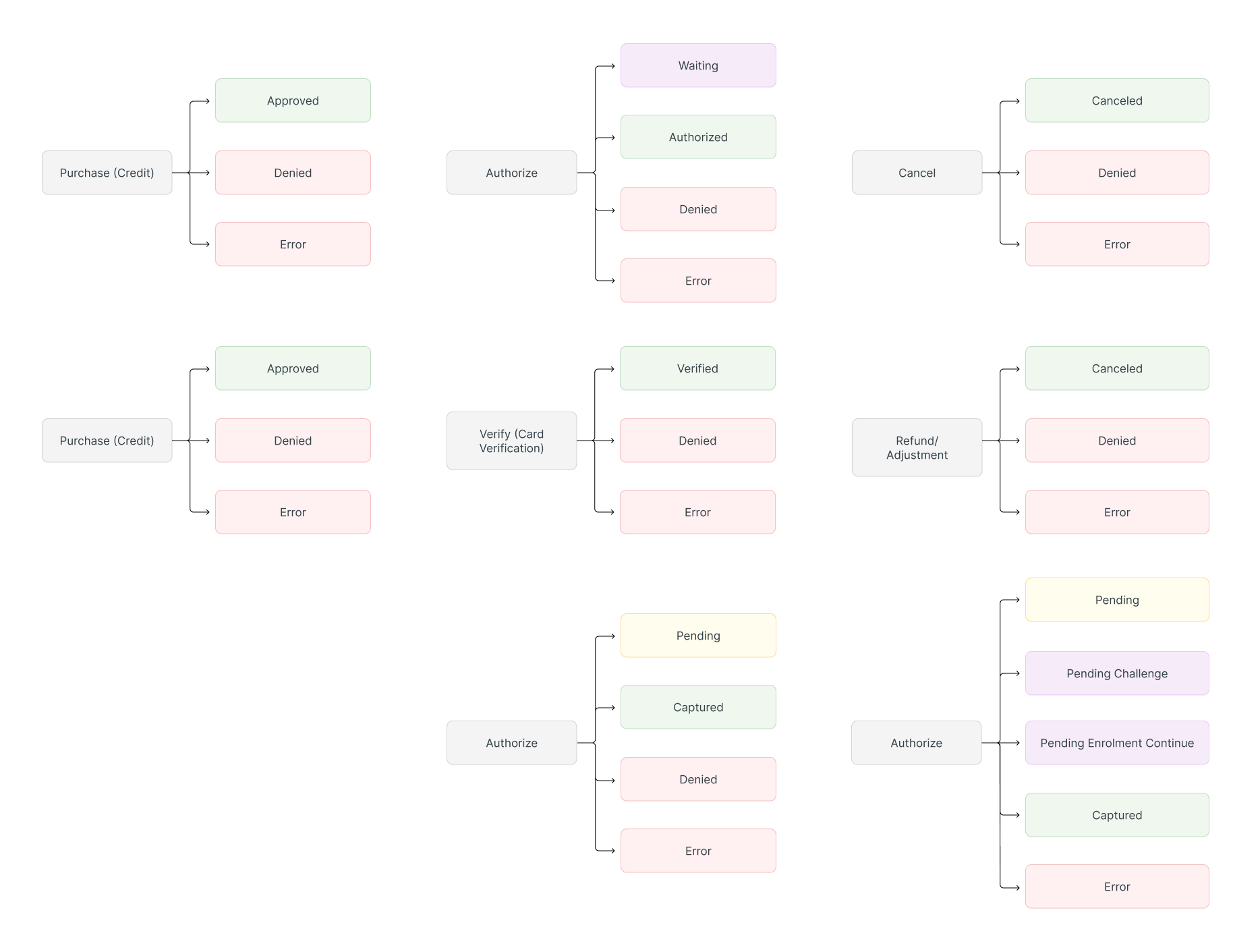
Transaction Statuses
Each transaction can have one of the following statuses depending on its processing stage and transaction type:
General Statuses
| Status | Description |
|---|---|
| PENDING | Transaction is being processed and awaiting a final status |
| WAITING | Transaction is waiting for additional action (e.g., customer authentication) |
| APPROVED | Transaction was successfully processed and approved |
| DENIED | Transaction was rejected by the issuer or payment processor |
| ERROR | An error occurred during transaction processing |
| EXPIRED | Transaction expired before completion (e.g., authorization expired) |
Operation-Specific Statuses
Some transaction types return operation-specific statuses upon successful completion:
| Status | Transaction Type | Description |
|---|---|---|
| AUTHORIZED | Authorization | Authorization was successfully approved and funds are reserved |
| CAPTURED | Capture | Capture was successfully completed and funds are being settled |
| CANCELED | Cancel | Cancellation was successfully processed and funds are being returned |
| VERIFIED | Card Verification | Card verification was successfully completed |
3DS Authentication Statuses
3D Secure authentication uses specific statuses:
| Status | Description |
|---|---|
| Pending | Authentication is being processed |
| Pending Challenge | Additional cardholder challenge is required |
| Pending Enrolment Continue | Enrolment process requires continuation |
| Authenticated | Cardholder was successfully authenticated |
| Denied | Authentication was denied or failed |
Transaction Lifecycle
The typical transaction lifecycle depends on the payment flow:
- Payment request is sent
- Transaction status:
PENDING→APPROVEDorDENIED - Funds are immediately charged and settled
- Authorization request is sent
- Transaction status:
PENDING→AUTHORIZEDorDENIED - Funds are reserved but not charged
- Capture request is sent (within validity period)
- Transaction status:
PENDING→CAPTUREDorDENIED - Funds are charged and settled
- Cancel (Same-Day / D+0): Reverses a payment before it enters the card network settlement flow. Transaction status changes to
CANCELED - Refund (D+1 or Later): Returns funds to customer after the transaction has been settled through the card network. Transaction status changes to
APPROVED(for the refund transaction)
Transaction Identification
Each transaction in the GetNet Regional API has several identifiers:
payment_id: Identifier linking the transaction to its parent payment.order_id: Merchant's order reference for the transaction. This is the primary field merchants use for reconciliation, as it matches your internal order system.idempotency_key: Key used to prevent duplicate operations (must be unique per request).
Querying Transactions
You can query transaction details using the Get Transaction endpoint, which returns detailed information about a specific transaction, including its status, amount, timestamps, and related operations.
While you can query transactions on demand, we strongly recommend using Webhooks to receive real-time transaction status updates. Webhooks are more efficient and scalable than polling the API repeatedly, as they push notifications to your system automatically when transaction statuses change. This approach reduces processing load on both your system and GetNet's API, ensuring better performance and reliability.
See Also
- For information about creating payments, see the payment guides in the documentation.
- To understand how to handle transaction status updates, see Webhooks.
- For details about secure payment processing, see Tokenization and 3DS Authentication 2.0.
On this page