How Webhooks Work
Webhooks provide real-time event notifications about your transactions and payment activities. When events occur that you've subscribed to, Getnet sends an HTTP POST request to your webhook endpoint with the event details.
This event-driven approach allows you to receive immediate updates about:
- Transaction status changes (approved, rejected, captured, cancelled, refunded)
- Payment events (successful, failed, pending)
- Card updates (expiration changes, token renewals)
- And other payment-related events
How it works
An overview of the flow of webhooks subscription and notification can be seen in the diagram below:
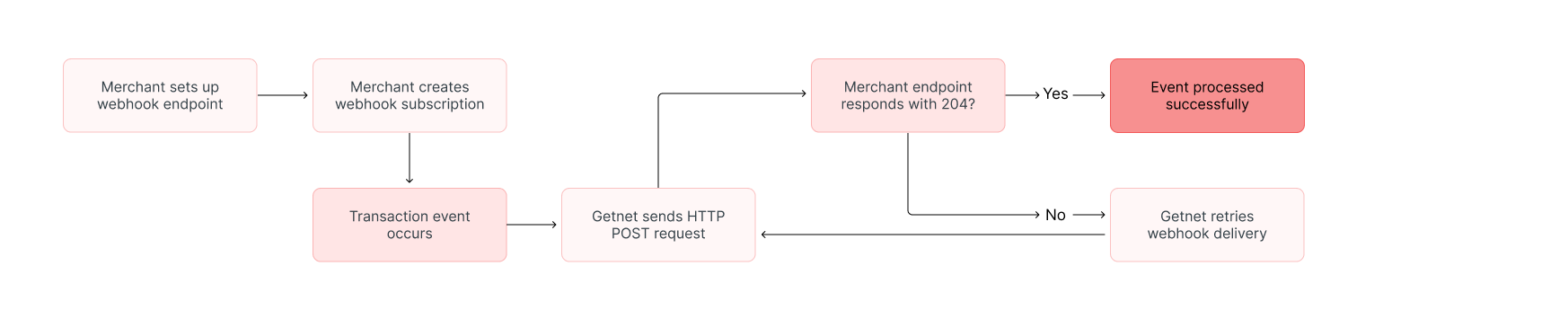
The webhook system follows a three-step workflow:
1. Configuration
Configure your webhook URL and choose which events you want to receive. Using the Getnet Webhook Management API, you can:
- Register a notification URL
- Subscribe to specific event types based on your business needs
- Configure authentication for your endpoint
- Update or remove existing webhook subscriptions
Supported authentication methods
When registering a webhook, you must choose one of three supported authentication methods:
- Basic Auth (
user_credentials) – Getnet includes a standardAuthorization: Basicheader composed of theclient_idandclient_secretyou provide. Configure your endpoint to validate those credentials on every webhook call. - OAuth 2.0 (
oauth) – Before sending the webhook, Getnet requests an access token from the OAuth server you define (using the supplied client ID and secret). The resulting token is then attached to the webhook request as a Bearer token. Use this option when your endpoint expects OAuth Bearer tokens instead of Basic credentials. - Token (
token) – Getnet uses a Bearer token obtained from the Getnet Authentication API. This is the same token you use to authenticate other Getnet API requests. Use this option when your endpoint expects Bearer tokens and you want to use Getnet's authentication system. See the Authentication documentation for details on obtaining tokens from the authentication endpoint.
Pick the option that matches how your webhook endpoint authenticates inbound calls. Theoauthmode runs the full OAuth 2.0 client credentials flow on your behalf, whiletokenuses a token you've already obtained from Getnet's authentication endpoint.

For detailed authentication configuration, see the Webhooks Reference documentation.
Endpoint requirements
Your webhook endpoint must meet these requirements:
- Accept HTTP
POSTrequests - Use HTTPS with a valid SSL certificate
- Respond with HTTP status code
204(No Content) when the webhook is received successfully
Your webhook endpoint must use HTTPS with a valid SSL certificate. Keep track of certificate expiry dates, as expired certificates will prevent webhook delivery.
2. Notification
POST request to your configured URL, containing all relevant event data. This happens in real time as transactions are processed.Available event types
Getnet offers the following webhook event types that cover the complete transaction lifecycle:
| Event Type | Description |
|---|---|
APPROVED_TRANSACTIONS | Payment has been successfully approved |
REJECTED_TRANSACTIONS | Payment was rejected or denied |
CAPTURED_TRANSACTIONS | Pre-authorized payment has been captured |
CANCELLED_TRANSACTIONS | Transaction has been cancelled |
REVERSED_TRANSACTIONS | Card Present authorization has been reversed before capture |
REFUNDED_TRANSACTIONS | Transaction has been refunded |
CARD_UPDATE | Card details updated via Network Token or Account Updater |
CARD_UPDATED_TRANSACTIONS | Card details updated on a transaction via Network Token or Account Updater |
PENDING_TRANSACTIONS | Transaction is pending processing |
PIX_UPDATED_TRANSACTIONS | PIX transaction status has been updated |
BOLETO_UPDATED_TRANSACTIONS | Boleto transaction status has been updated |
BOLETO_PAID_TRANSACTIONS | Boleto has been paid |
PROCESSING_TRANSACTIONS | Transaction is being processed |
FAILED_TRANSACTIONS | Transaction processing has failed |
EXPIRED_TRANSACTIONS | Transaction has expired |
AUTHORIZED_TRANSACTIONS | Transaction has been authorized |
When creating a webhook subscription, you specify which events you want to receive. This allows you to set up different webhook endpoints for different event types or handle all events at a single endpoint.
For complete details about each event type and their payloads, see the Webhook Payloads documentation.
3. Reception
Your receiving system processes the notification and performs appropriate actions based on the received information. This might include:
- Updating order status in your database
- Triggering customer notifications
- Initiating fulfilment processes
- Recording transaction outcomes for reconciliation
- Updating card tokens when card details change
204 (No Content) status code. Events are processed and sent only on successful completion to ensure data integrity.Webhook Management API
The Getnet Webhook Management API provides endpoints to manage your webhook subscriptions programmatically. The API allows you to:
- Create subscriptions – Register new webhook endpoints for specific events
- List subscriptions – Retrieve all your webhook subscriptions
- Delete subscriptions – Remove webhook subscriptions you no longer need
- View event history – List all webhook messages sent for a subscription
- Resend events – Request retry of specific webhook deliveries
- List subscribed events – View all events you are currently subscribed to
For detailed API endpoint documentation including request/response schemas, parameters, and examples, refer to the API Reference and Webhooks Reference documentation.
You can configure different webhook URLs for different environments (development, staging, production) or for different event types to better organise your integration.
Reliability and retry logic
If your webhook endpoint fails to respond successfully (non-204 status code, timeout, or network error), Getnet will automatically retry the webhook delivery to ensure reliable event notification.
Webhook payloads
Each webhook event includes a JSON payload with transaction details. The payload structure varies by event type and payment method. All payloads include:
- Transaction identifiers (
payment_id,order_id,transaction_id) - Amount and currency information
- Status and reason codes
- Timestamps in ISO 8601 format
- Event-specific fields
For complete payload documentation including field descriptions, examples for each event type, and payment method-specific fields, see the Webhook Payloads documentation.
Next steps
Now that you understand how webhooks work, you're ready to integrate them into your application:
- Review authentication options – Choose the authentication method that matches your endpoint's requirements. See the Webhooks Reference for details.
- Explore available events – Review the event types and determine which ones you need. See the Webhooks Reference for the complete list.
- Set up your endpoint – Ensure your webhook endpoint meets the requirements and can handle the expected payloads.
- Create subscriptions – Use the Webhook Management API to create subscriptions. See the API Reference for endpoint details.
- Review payload structures – Familiarise yourself with the payload structure for each event type you'll receive. See the Webhook Payloads documentation for complete details.
On this page