Chargeback Management
1. Briefing
The Chargeback API is a communication channel between the platform and merchants that have disputes assigned to them. It offers a solution for handling disputes, allowing the merchants to manage chargebacks across all sellers from a single view.
It is possible to:
- List disputes assigned to the merchant
- View dispute details
- View dispute history and audit trail
- Contest (submit a challenge) or accept a dispute
- Upload supporting documents (evidence)
- Download or list previously uploaded documents
The API is designed for secure, auditable exchanges and supports pagination, filtering, and role-based access.
2. Common Concepts and Permissions
2.1 Dispute Status
dispute_status is the primary status of a dispute. It indicates whether there is a pending action required from the merchant, whether the dispute is under analysis by Getnet, or whether it has already reached a final outcome.| Status | Description |
|---|---|
needs_response | Merchant must send the document or accept the chargeback. |
in_review | Response being validated by Getnet Network. |
dispute_won | The merchant won the dispute, and any chargeback debit is reversed. |
dispute_lost | The merchant lost the dispute, and the chargeback amount will be debited from merchant. |
dispute_partially_won | The merchant recovers funds corresponding to the portion proven valid. The cardholder receives a refund for the successfully disputed amount. |
2.2 Merchant Status
merchant_status acts as a supporting status that provides additional context to the dispute_status. It categorizes the merchant's current position within the dispute| Status | Description |
|---|---|
merchant_notified | The merchant has been notified that a response is needed. |
verification_required | There are no pending issues on the merchant's side the necessary documents have been provided. |
documentation_reproved | Getnet staff determined that the uploaded documents cannot be used as evidence. |
chargeback_accepted | There are no pending issues on the merchant's side the chargeback has been accepted. |
2.3 Cycles
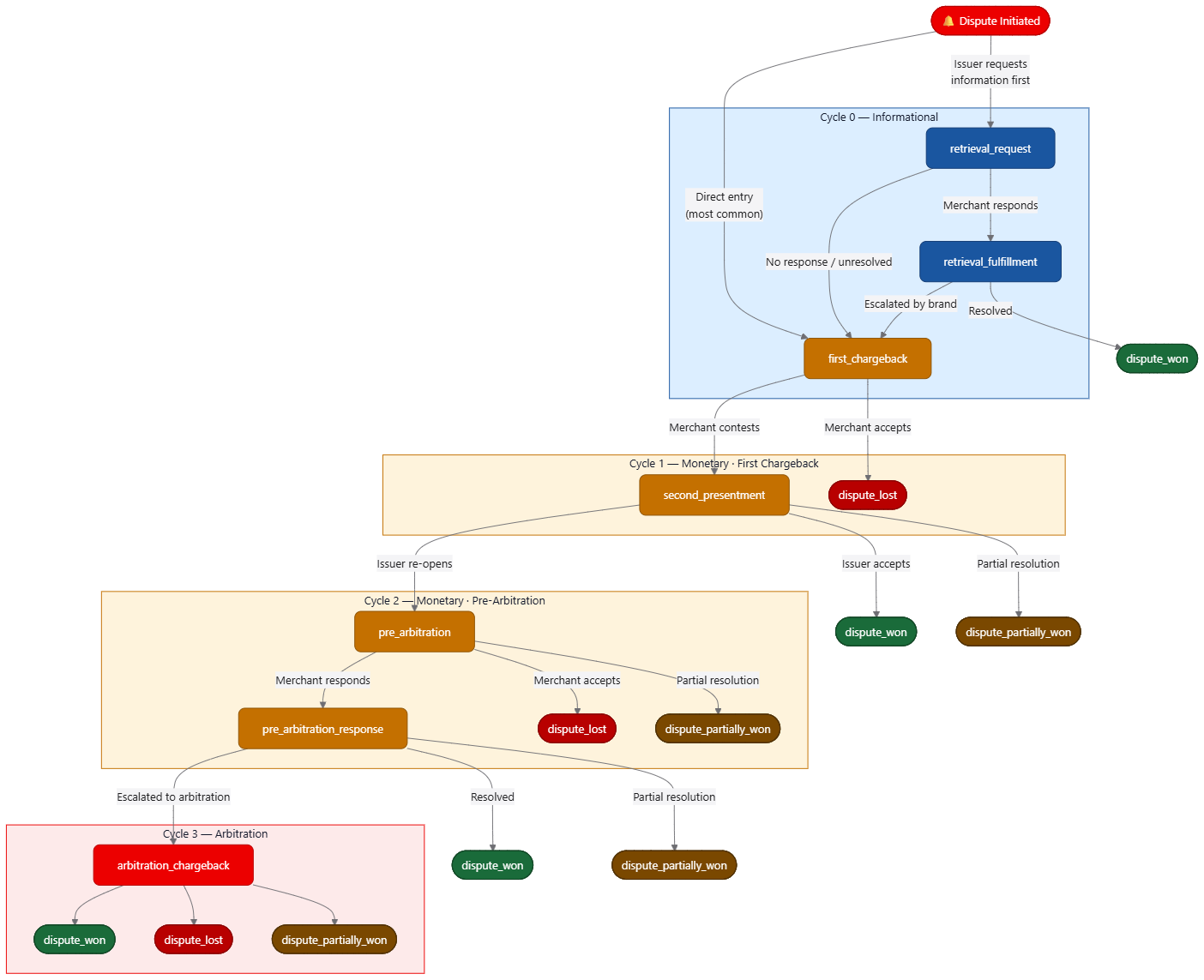
Cycles represent the phases of a dispute lifecycle. All card brands have their stages normalized within the chargeback cycle structure below.
Cycle 0 Informational
Non-monetary phase. The issuer requests additional information before formally initiating a chargeback.

| Status | Description |
|---|---|
retrieval_request | Occurs when the card issuer requests additional information about a transaction before initiating a chargeback. |
retrieval_fulfillment | The merchant's response to a retrieval request. Includes all documents and notes submitted to satisfy the issuer's inquiry. If the retrieval request remains unanswered or unresolved, the brand may escalate to a monetary cycle. |
Cycle 1 Monetary (First Chargeback)
Monetary phase. Funds may be debited from the merchant.
| Status | Description |
|---|---|
first_chargeback | Occurs when the issuer or cardholder disputes a transaction and funds can be debited from the merchant. |
second_presentment | The merchant's formal response to the first chargeback. The merchant submits evidence to the acquirer, who forwards it to the issuer for review. |
Cycle 2 Monetary (Pre-Arbitration)
Monetary phase. The issuer re-opens the dispute after reviewing the merchant's representment.
| Status | Description |
|---|---|
pre_arbitration | Occurs when the issuer disagrees with the merchant's second presentment. Last opportunity before escalating to card network arbitration. |
pre_arbitration_response | The merchant's response to the pre-arbitration. If unresolved, the dispute proceeds to final arbitration. |
Cycle 3 Arbitration
Final stage. The card network makes a binding decision that is non-reversible.
| Status | Description |
|---|---|
arbitration_chargeback | The card network rules in favor of either party after reviewing all submitted evidence. This decision is final. |
Cycle Progression and Finalization
| Cycle | Type | Statuses | Possible Outcomes |
|---|---|---|---|
| Cycle 0 | Informational | retrieval_request → retrieval_fulfillment | Resolved → dispute_won · Escalated → enters Cycle 1 |
| Cycle 1 | Monetary | first_chargeback → second_presentment | dispute_won · dispute_lost · dispute_partially_won · Escalated → enters Cycle 2 |
| Cycle 2 | Monetary | pre_arbitration → pre_arbitration_response | dispute_won · dispute_lost · dispute_partially_won · Escalated → enters Cycle 3 |
| Cycle 3 | Arbitration | arbitration_chargeback | dispute_won · dispute_lost · dispute_partially_won |
| Status | Meaning |
|---|---|
dispute_won | The merchant's contestation was accepted. Any chargeback debit is reversed. Can be reached at the end of Cycles 0, 1, 2, or 3. |
dispute_lost | The dispute was ruled in favor of the cardholder. The chargeback amount is debited from the merchant. Can occur at Cycles 1, 2, or 3. |
dispute_partially_won | A portion of the disputed amount is returned to the merchant; the remainder is awarded to the cardholder. Can occur from second_presentment (Cycle 1), pre_arbitration, pre_arbitration_response (Cycle 2), or arbitration_chargeback (Cycle 3). |
3. Response Deadlines (SLA)
merchant_expiration_date field, returned by the following endpoints:| Endpoint | Where merchant_expiration_date appears |
|---|---|
GET /disputes | Inside each item of the response list (situation.merchant_expiration_date) |
GET /disputes/{dispute_id} | In the dispute detail response (situation.merchant_expiration_date) |
GET /disputes/{dispute_id}/cycles | Per cycle record (merchant_expiration_date) |
merchant_expiration_date as the authoritative deadline — do not rely on a fixed 15-day window, as the actual deadline may vary by card brand, market, and dispute type.3.1 Conditions to Respond to a Dispute
| Condition | Description |
|---|---|
dispute_status = needs_response | The dispute is in a state that requires merchant action. Any other status (e.g., in_review, dispute_won, dispute_lost) means the window has already closed or is not applicable. |
merchant_expiration_date not yet passed | The response deadline has not expired. Once the current date exceeds merchant_expiration_date, the dispute can no longer be acted upon. |
If either condition is not met, the following endpoints will return an error:
| Endpoint | Action blocked after expiration or outside needs_response |
|---|---|
PATCH /disputes/{dispute_id} | Accept the dispute — blocked |
POST /disputes/{dispute_id}/evidences | Submit contestation — blocked |
Important: Uploading documents viaPOST /disputes/{dispute_id}/documentsmay still be technically possible after the deadline, but those documents will have no effect if the contestation cannot be submitted. Always submit the contestation beforemerchant_expiration_date.
4. Chargeback API
Available Endpoints
| Method | Endpoint | Purpose |
|---|---|---|
GET | /reason-codes | Lists all reason codes used by card brands to open disputes |
GET | /disputes | Lists and filters disputes by date, brand, status, cycle, and more |
GET | /disputes/{dispute_id} | Retrieves full details of a specific dispute |
PATCH | /disputes/{dispute_id} | Accepts a dispute (merchant concedes the chargeback) |
POST | /disputes/{dispute_id}/evidences | Submits previously uploaded documents as evidence for re-evaluation |
GET | /disputes/{dispute_id}/cycles | Retrieves the full cycle history of a dispute |
POST | /disputes/{dispute_id}/documents | Uploads a document to attach as evidence |
GET | /disputes/{dispute_id}/documents | Lists all documents attached to a dispute |
GET | /disputes/{dispute_id}/documents/{document_id} | Downloads a specific document (PDF) |
DELETE | /disputes/{dispute_id}/documents/{document_id} | Deletes a document that has not yet been submitted |
Environments
| Environment | Base URL | Auth URL |
|---|---|---|
| Sandbox | https://api-sbx.pre.globalgetnet.com/chb/global-disputes/v1 | https://api-sbx.pre.globalgetnet.com |
| UAT | https://api.pre.globalgetnet.com/chb/global-disputes/v1 | https://api.pre.globalgetnet.com/authentication/oauth2/access_token |
| Production | https://api.globalgetnet.com/chb/global-disputes/v1 | https://api.globalgetnet.com/authentication/oauth2/access_token |
client_id / client_secret). Tokens are short-lived (1 hour) and must be renewed via the token endpoint before each session.4.1 Access to Credentials
Credentials are issued per environment. The method for obtaining them depends on which environment you are targeting.
Sandbox
client_id and client_secret directly at the developer portal:https://docs.globalgetnet.com/en/products/business-operations/chargeback/swagger
UAT and Production
client_id and client_secret for each environment.4.2 Prerequisites
client_id and client_secret for the target environment (see 4.1 Access to Credentials), and an active OAuth2 access token (see 4.3 Authentication & Authorization).Sandbox
| Value | |
|---|---|
| Base URL | https://api-sbx.pre.globalgetnet.com/chb/global-disputes/v1 |
| Auth URL | https://api-sbx.pre.globalgetnet.com/authentication/oauth2/access_token |
| Credentials | Self-service at predocs.globalgetnet.com |
UAT
| Value | |
|---|---|
| Base URL | https://api.pre.globalgetnet.com/chb/global-disputes/v1 |
| Auth URL | https://api.pre.globalgetnet.com/authentication/oauth2/access_token |
| Credentials | Provided by Account Manager |
Production
| Value | |
|---|---|
| Base URL | https://api.globalgetnet.com/chb/global-disputes/v1 |
| Auth URL | https://api.globalgetnet.com/authentication/oauth2/access_token |
| Credentials | Provided by Account Manager |
client_id / client_secret)4.3 Authentication & Authorization
curl -X POST https://api.pre.globalgetnet.com/authentication/oauth2/access_token \
  -H "Content-Type: application/x-www-form-urlencoded" \
  --data-urlencode "grant_type=client_credentials" \
  --data-urlencode "client_id=client_id" \
--data-urlencode "client_secret=client_secret"curl -X POST https://api.pre.globalgetnet.com/authentication/oauth2/access_token \
-H "Content-Type: application/x-www-form-urlencoded" \
--data-urlencode "grant_type=client_credentials" \
--data-urlencode "client_id=client_id" \
--data-urlencode "client_secret=client_secret"All tokens are short-lived and should be refreshed via the OAuth2 flow. Refresh tokens are supported where applicable.
4.4 Example Authentication Flow
- Obtain an access token from
/oauth2/access_token - Use the token in all subsequent API calls:
Authorization: Bearer <access_token> - Token expires after 1 hour use refresh token if available
curl -X POST https://api.pre.globalgetnet.com/authentication/oauth2/access_token \
  -H "Content-Type: application/x-www-form-urlencoded" \
  --data-urlencode "grant_type=client_credentials" \
  --data-urlencode "client_id=client_id" \
--data-urlencode "client_secret=client_secret"curl -X POST https://api.pre.globalgetnet.com/authentication/oauth2/access_token \
-H "Content-Type: application/x-www-form-urlencoded" \
--data-urlencode "grant_type=client_credentials" \
--data-urlencode "client_id=client_id" \
--data-urlencode "client_secret=client_secret"{
"access_token": "Base64...",
"token_type": "Bearer",
"expires_in": 3600
}{
"access_token": "Base64...",
"token_type": "Bearer",
"expires_in": 3600
}4.5 Chargeback Management Process
Contesting a chargeback through the API follows a defined sequence of steps. Each step maps to a dedicated endpoint described in the subsections below.
| Step | Action | Section |
|---|---|---|
| 1 | List and filter disputes to identify those requiring action | 4.6 List and Filter Disputes |
| 2 | Retrieve the full details of a specific dispute | 4.7 Chargeback Details |
| 3 | Upload evidence documents to support the contestation | 4.8 Documents |
| 4 | Submit the contestation referencing the uploaded documents | 4.9 Contest a Dispute (Submit Evidence) |
| 5 | Monitor the dispute history and track the outcome | 4.7 Chargeback Details / 4.11 Retrieve Cycles |
For a complete walkthrough with curl examples for each step, see Section 5 End-to-End Example: Contesting a Dispute.
4.6 List and Filter Disputes
Returns a paginated list of disputes assigned to the merchant. Use query parameters to filter by status, date range, or seller.
curl -X GET "https://api.pre.globalgetnet.com/chb/global-disputes/v1/disputes?dispute_status=needs_response&page=0&size=20" \
--header "Authorization: Bearer {{TOKEN}}"curl -X GET "https://api.pre.globalgetnet.com/chb/global-disputes/v1/disputes?dispute_status=needs_response&page=0&size=20" \
--header "Authorization: Bearer {{TOKEN}}"Tip: filter bydispute_status=needs_responsecombined withmerchant_expiration_dateordering to prioritize disputes requiring immediate action.
Please check all API information via: Portal API Getnet Docs
4.7 Chargeback Details
GET /disputes/{dispute_id}Retrieves the full details of a specific dispute, including transaction data, card information, merchant details, current status, and all documents attached to the dispute.
dispute_status, check the merchant_expiration_date, and review the reason code before deciding whether to contest or accept.curl -X GET "https://api.pre.globalgetnet.com/chb/global-disputes/v1/disputes/f4b8b62e-4825-4f98-b6ff-7d7bdf7cdba8" \
-H "Authorization: Bearer {{TOKEN}}"curl -X GET "https://api.pre.globalgetnet.com/chb/global-disputes/v1/disputes/f4b8b62e-4825-4f98-b6ff-7d7bdf7cdba8" \
-H "Authorization: Bearer {{TOKEN}}"Please check all API information via: Portal API Getnet Docs
4.8 Documents Upload, List, Download, Delete
The Documents API allows the merchant to manage evidence files attached to a dispute. The following operations are available:
| Operation | Method | Endpoint |
|---|---|---|
| Upload a document | POST | /disputes/{dispute_id}/documents |
| List documents | GET | /disputes/{dispute_id}/documents |
| Download a document | GET | /disputes/{dispute_id}/documents/{document_id} |
| Delete a document | DELETE | /disputes/{dispute_id}/documents/{document_id} |
Important: Upload is only available whendispute_status = needs_response. Documents must be uploaded before submitting a contestation viaPOST /disputes/{dispute_id}/evidences.
dispute_status = needs_response and the document has not yet been submitted as part of a contestation. Once the merchant submits the contestation or accepts the dispute, all uploaded documents are locked and cannot be deleted.reason header is required when deleting a document.File Requirements
Warning: The API validates only file size and format at upload time. Compliance with the specifications below is the merchant's responsibility. Documents that do not meet these requirements may be silently rejected by the card network during dispute processing, causing the contestation to be dismissed without further notice.
| Constraint | Limit |
|---|---|
| Maximum size per file | 5 MB |
| Maximum total request size (including headers) | 10 MB |
| Maximum pages per file | 18 pages |
Multiple files can be attached to a single contestation, provided the total request size does not exceed 10 MB.
Recommendation (pages): The 18-page limit should also be observed for the sum of the pages of all files submitted in the same contestation, not only per file. Contestations whose combined page count exceeds this limit may be rejected by the card network.
| Constraint | Requirement |
|---|---|
| File format | |
| Page orientation | Portrait (vertical) recommended |
| Page size | 8.27 × 11.69 inches (A4) |
| Maximum resolution | 300 PPI |
| Maximum total pixels per page | 30,000,000 px |
Recommendation: Ensure all pages in a single PDF share the same orientation and dimensions. Mixed-orientation documents may be rejected or misread by the card network.
4.9 Contest a Dispute (Submit Evidence)
POST /disputes/{dispute_id}/evidencesOnce all evidence documents have been uploaded (see 4.8 Documents), use this endpoint to formally submit the contestation. Getnet will validate the submission and forward the evidence to the card network for re-evaluation.
dispute_status from needs_response to in_review.Important: This endpoint can only be called whendispute_status = needs_response. Alldocument_idvalues referenced in the request body must belong to documents already uploaded for this dispute and not yet submitted in a previous contestation.
{
  "reason": "Customer received the product and signed the delivery receipt.",
  "document_id": [
    "a1c2d3e4-1234-5678-abcd-ef0123456789"
  ]
}{
"reason": "Customer received the product and signed the delivery receipt.",
"document_id": [
"a1c2d3e4-1234-5678-abcd-ef0123456789"
]
}| Field | Type | Required | Description |
|---|---|---|---|
reason | string | No | Free-text explanation for the contestation. Visible to Getnet staff during review. |
document_id | array of strings (UUID) | Yes | IDs of the uploaded documents to be submitted as evidence. |
curl -X POST "https://api.pre.globalgetnet.com/chb/global-disputes/v1/disputes/f4b8b62e-4825-4f98-b6ff-7d7bdf7cdba8/evidences" \
  -H "Authorization: Bearer {{TOKEN}}" \
  -H "Content-Type: application/json" \
  -d '{
    "reason": "Customer received the product and signed the delivery receipt.",
    "document_id": ["a1c2d3e4-1234-5678-abcd-ef0123456789"]
}'curl -X POST "https://api.pre.globalgetnet.com/chb/global-disputes/v1/disputes/f4b8b62e-4825-4f98-b6ff-7d7bdf7cdba8/evidences" \
-H "Authorization: Bearer {{TOKEN}}" \
-H "Content-Type: application/json" \
-d '{
"reason": "Customer received the product and signed the delivery receipt.",
"document_id": ["a1c2d3e4-1234-5678-abcd-ef0123456789"]
}'201 Created response confirms the contestation was received. From this point, the dispute is locked for editing and the merchant should monitor the outcome via 4.11 Retrieve Cycles or 4.7 Chargeback Details.Please check all API information via: Portal API Getnet Docs
4.10 Accept a Dispute
PATCH /disputes/{dispute_id}Important: This endpoint can only be called whendispute_status = needs_response. Acceptance is irreversible once accepted, documents already uploaded are locked and no contestation can be submitted for the dispute.
| Field | Value |
|---|---|
dispute_status | in_review |
merchant_status | chargeback_accepted |
dispute_status. The merchant can follow the outcome via 4.11 Retrieve Cycles or 4.7 Chargeback Details.4.11 Retrieve Cycles for a Dispute
GET /disputes/{dispute_id}/cyclesThis endpoint allows the merchant to follow the full history of a dispute. Each entry in the response represents a recorded state change a new cycle opened or a status updated and contains a summarized snapshot of the dispute at that point in time.
Each cycle record includes the key information that was current at the moment of the event:
| Field | Description |
|---|---|
cycle | The dispute cycle active at the time of the event (e.g., first_chargeback, second_presentment) |
dispute_status | The dispute status at the time of the event (e.g., needs_response, in_review, dispute_won) |
merchant_status | The merchant-facing status at the time of the event |
amount / currency_code | The disputed amount and currency applicable to that cycle |
merchant_expiration_date | The deadline specific to the merchant for submitting evidence |
cycle_create_date | The date the card brand sent the incoming request for that cycle |
backoffice_merchant_response | Any feedback from Getnet staff, such as reasons for document rejection |
created_at | Timestamp when this cycle record was created in the system |
By calling this endpoint over time, the merchant can reconstruct the complete timeline of a dispute from the first notification through contestation, re-evaluation, and final resolution.
curl -X GET "https://api.pre.globalgetnet.com/chb/global-disputes/v1/disputes/f4b8b62e-4825-4f98-b6ff-7d7bdf7cdba8/cycles" \
-H "Authorization: Bearer {{TOKEN}}"curl -X GET "https://api.pre.globalgetnet.com/chb/global-disputes/v1/disputes/f4b8b62e-4825-4f98-b6ff-7d7bdf7cdba8/cycles" \
-H "Authorization: Bearer {{TOKEN}}"[
{
"cycle": "first_chargeback",
"dispute_status": "needs_response",
"merchant_status": "merchant_notified",
"amount": 20000,
"currency_code": "MXN",
"merchant_expiration_date": "2024-02-24T23:59:59.000Z",
"cycle_create_date": "2024-02-09T13:02:43.762Z",
"dispute_reason_code": "4853",
"dispute_reason_name": "Cardholder Dispute",
"backoffice_merchant_response": null,
"created_at": "2024-02-09T13:05:00.441Z"
},
{
"cycle": "second_presentment",
"dispute_status": "in_review",
"merchant_status": "verification_required",
"amount": 20000,
"currency_code": "MXN",
"merchant_expiration_date": null,
"cycle_create_date": null,
"dispute_reason_code": "4853",
"dispute_reason_name": "Cardholder Dispute",
"backoffice_merchant_response": null,
"created_at": "2024-02-25T09:14:22.123Z"
}
][
{
"cycle": "first_chargeback",
"dispute_status": "needs_response",
"merchant_status": "merchant_notified",
"amount": 20000,
"currency_code": "MXN",
"merchant_expiration_date": "2024-02-24T23:59:59.000Z",
"cycle_create_date": "2024-02-09T13:02:43.762Z",
"dispute_reason_code": "4853",
"dispute_reason_name": "Cardholder Dispute",
"backoffice_merchant_response": null,
"created_at": "2024-02-09T13:05:00.441Z"
},
{
"cycle": "second_presentment",
"dispute_status": "in_review",
"merchant_status": "verification_required",
"amount": 20000,
"currency_code": "MXN",
"merchant_expiration_date": null,
"cycle_create_date": null,
"dispute_reason_code": "4853",
"dispute_reason_name": "Cardholder Dispute",
"backoffice_merchant_response": null,
"created_at": "2024-02-25T09:14:22.123Z"
}
]Please check all API information via: Portal API Getnet Docs
4.12 Security and Compliance
- All endpoints require HTTPS (TLS 1.2+)
- Access is controlled by OAuth2 scopes and merchant ownership
- Evidence files are stored encrypted at rest
- All actions are logged for audit
- Compliance with PCI-DSS, GDPR, and LGPD standards
5. End-to-End Example: Contesting a Dispute
The following walkthrough shows the complete sequence for identifying a dispute that requires a response, inspecting its details, uploading evidence, and submitting a contestation.
Step 1 List disputes with pending action
dispute_status=needs_response to find those awaiting merchant action. See 4.6 List and Filter Disputes for all available filters.curl -X GET "https://api.pre.globalgetnet.com/chb/global-disputes/v1/disputes?dispute_status=needs_response&limit=10&page=1" \
-H "Authorization: Bearer {{TOKEN}}"curl -X GET "https://api.pre.globalgetnet.com/chb/global-disputes/v1/disputes?dispute_status=needs_response&limit=10&page=1" \
-H "Authorization: Bearer {{TOKEN}}"dispute_id of the dispute you want to contest:[
{
"dispute": {
"dispute_id": "f4b8b62e-4825-4f98-b6ff-7d7bdf7cdba8",
"merchant_name": "My Store",
"amount": "20000",
"currency": "484",
"situation": {
"dispute_status": "needs_response",
"merchant_status": "merchant_notified",
"cycle": "first_chargeback",
"dispute_reason_code": "4853",
"dispute_reason_name": "Cardholder Dispute",
"merchant_expiration_date": "2024-02-24T23:59:59.000Z"
}
}
}
][
{
"dispute": {
"dispute_id": "f4b8b62e-4825-4f98-b6ff-7d7bdf7cdba8",
"merchant_name": "My Store",
"amount": "20000",
"currency": "484",
"situation": {
"dispute_status": "needs_response",
"merchant_status": "merchant_notified",
"cycle": "first_chargeback",
"dispute_reason_code": "4853",
"dispute_reason_name": "Cardholder Dispute",
"merchant_expiration_date": "2024-02-24T23:59:59.000Z"
}
}
}
]Step 2 Retrieve dispute details
dispute_id to fetch the full details of the dispute, including transaction data and current status. See 4.7 Chargeback Details.curl -X GET "https://api.pre.globalgetnet.com/chb/global-disputes/v1/disputes/f4b8b62e-4825-4f98-b6ff-7d7bdf7cdba8" \
-H "Authorization: Bearer {{TOKEN}}"curl -X GET "https://api.pre.globalgetnet.com/chb/global-disputes/v1/disputes/f4b8b62e-4825-4f98-b6ff-7d7bdf7cdba8" \
-H "Authorization: Bearer {{TOKEN}}"dispute_status is needs_response and note the merchant_expiration_date this is your deadline to submit evidence.Step 3 Upload evidence document
Upload a PDF file with the supporting evidence (e.g., proof of delivery, invoice, communication records). See 4.8 Documents for file requirements.
curl -X POST "https://api.pre.globalgetnet.com/chb/global-disputes/v1/disputes/f4b8b62e-4825-4f98-b6ff-7d7bdf7cdba8/documents" \
-H "Authorization: Bearer {{TOKEN}}" \
-F "description=Proof of delivery signed by customer" \
-F "file=@proof_of_delivery.pdf"curl -X POST "https://api.pre.globalgetnet.com/chb/global-disputes/v1/disputes/f4b8b62e-4825-4f98-b6ff-7d7bdf7cdba8/documents" \
-H "Authorization: Bearer {{TOKEN}}" \
-F "description=Proof of delivery signed by customer" \
-F "file=@proof_of_delivery.pdf"201 Created response confirms the upload was successful. Note the document_id returned you will need it in the next step.{
"document_id": "a1c2d3e4-1234-5678-abcd-ef0123456789"
}{
"document_id": "a1c2d3e4-1234-5678-abcd-ef0123456789"
}You can upload multiple documents before submitting. Each must be uploaded individually.
Step 4 Submit the contestation
document_id(s). This triggers Getnet to forward the evidence to the card network for re-evaluation.curl -X POST "https://api.pre.globalgetnet.com/chb/global-disputes/v1/disputes/f4b8b62e-4825-4f98-b6ff-7d7bdf7cdba8/evidences" \
-H "Authorization: Bearer {{TOKEN}}" \
-H "Content-Type: application/json" \
-d '{
"reason": "Customer received the product and signed the delivery receipt.",
"document_id": ["a1c2d3e4-1234-5678-abcd-ef0123456789"]
}'curl -X POST "https://api.pre.globalgetnet.com/chb/global-disputes/v1/disputes/f4b8b62e-4825-4f98-b6ff-7d7bdf7cdba8/evidences" \
-H "Authorization: Bearer {{TOKEN}}" \
-H "Content-Type: application/json" \
-d '{
"reason": "Customer received the product and signed the delivery receipt.",
"document_id": ["a1c2d3e4-1234-5678-abcd-ef0123456789"]
}'201 Created response confirms the contestation was received. The dispute dispute_status will transition to in_review.Step 5 Monitor the outcome
Poll the dispute cycles to track the resolution. See 4.11 Retrieve Cycles.
curl -X GET "https://api.pre.globalgetnet.com/chb/global-disputes/v1/disputes/f4b8b62e-4825-4f98-b6ff-7d7bdf7cdba8/cycles" \
-H "Authorization: Bearer {{TOKEN}}"curl -X GET "https://api.pre.globalgetnet.com/chb/global-disputes/v1/disputes/f4b8b62e-4825-4f98-b6ff-7d7bdf7cdba8/cycles" \
-H "Authorization: Bearer {{TOKEN}}"dispute_won, dispute_lost, or dispute_partially_won), the cycle history will reflect the full timeline of the resolution.6. Webhooks Real-Time Chargeback Notifications
POST request with a JSON payload to the callback URL registered in your subscription.For the complete Webhooks reference including subscription management, authentication methods, retry logic, and all available event types see the official documentation:
Webhooks Reference predocs.globalgetnet.com
6.1 Chargeback events
| Event | Trigger |
|---|---|
CHARGEBACK_NEEDS_RESPONSE | A new chargeback has been assigned to the merchant and requires a response |
CHARGEBACK_NEEDS_RESPONSE event is fired when a new chargeback is registered on the platform and the merchant must take action. The notification payload is an array of dispute objects. When more than 100 disputes are pending notification, they are delivered in batches of up to 100 items per request.Upon receiving this event, the recommended flow is:
- Extract the
dispute_idfrom each item in the array. - Call 4.7 Chargeback Details to retrieve the full dispute data.
- Upload supporting evidence via 4.8 Documents.
- Submit the contestation via
POST /disputes/{dispute_id}/evidences.
[
  {
    "idempotency_key": "a3f9c12e-8b47-4d02-bc1e-9f2d3a4e5b67",
    "dispute_id": "f4b8b62e-4825-4f98-b6ff-7d7bdf7cdba8",
    "payment_id": "9c1f8a34-2d67-4b0e-a5f1-6c8b2e7d4a19",
    "affiliation_code": "674179",
    "event_type": "CHARGEBACK_NEEDS_RESPONSE",
    "cycle": "first_chargeback",
    "dispute_status": "needs_response",
    "merchant_status": "merchant_notified",
    "merchant_expiration_date": "2024-02-24T23:59:59.000Z",
    "reason_code": "4853",
    "amount": 20000,
    "currency": "MXN",
    "transaction_date": "2024-01-15T10:22:00.000Z",
    "acquirer_reference_number": "40397095747133411680659"
  }
][
{
"idempotency_key": "a3f9c12e-8b47-4d02-bc1e-9f2d3a4e5b67",
"dispute_id": "f4b8b62e-4825-4f98-b6ff-7d7bdf7cdba8",
"payment_id": "9c1f8a34-2d67-4b0e-a5f1-6c8b2e7d4a19",
"affiliation_code": "674179",
"event_type": "CHARGEBACK_NEEDS_RESPONSE",
"cycle": "first_chargeback",
"dispute_status": "needs_response",
"merchant_status": "merchant_notified",
"merchant_expiration_date": "2024-02-24T23:59:59.000Z",
"reason_code": "4853",
"amount": 20000,
"currency": "MXN",
"transaction_date": "2024-01-15T10:22:00.000Z",
"acquirer_reference_number": "40397095747133411680659"
}
]| Field | Type | Description |
|---|---|---|
idempotency_key | string (UUID) | Unique key per delivery — use to deduplicate events processed more than once |
dispute_id | string (UUID) | The dispute identifier — use in all subsequent API calls |
payment_id | string (UUID) | Identifier of the payment related to the disputed transaction — use to reconcile the chargeback with the original payment in your system |
affiliation_code | string | Merchant affiliation code used by the card brand |
event_type | string | Always CHARGEBACK_NEEDS_RESPONSE for this event |
cycle | string | The active dispute cycle (e.g., first_chargeback, retrieval_request) |
dispute_status | string | Always needs_response at notification time |
merchant_status | string | Always merchant_notified at notification time |
merchant_expiration_date | string (ISO 8601) | Deadline by which the merchant must respond |
reason_code | string | Reason code assigned by the card brand (see Section 7) |
amount | number | Disputed amount in the smallest currency unit (e.g., cents) |
currency | string | ISO 4217 alpha-3 currency code (e.g., MXN, BRL, CLP) |
transaction_date | string (ISO 8601) | Date and time of the original disputed transaction |
acquirer_reference_number | string | Acquirer reference number (ARN) for the transaction |
Batching: If more than 100 disputes are queued for notification, Getnet delivers them in multiple requests, each containing up to 100 items in the array.
6.2 Endpoint Requirements
Your webhook endpoint must:
- Accept HTTP
POSTrequests - Use HTTPS with a valid SSL certificate
- Respond with HTTP
204(No Content) to acknowledge successful receipt - Be idempotent the same event may be delivered more than once (use
idempotency_keyto deduplicate)
204, Getnet considers the delivery failed and will retry the webhook.6.3 Subscription Setup
Webhook subscriptions are managed via the Webhook Management API. To subscribe to chargeback events:
curl -X POST " https://api.pre.globalgetnet.com/webhooks/v1/subscriptions" \
  -H "Authorization: Bearer {{TOKEN}}" \
  -H "Content-Type: application/json" \
  -d '{
    "event_type": "CHARGEBACK_NEEDS_RESPONSE",
    "callback_url": "https://your-system.example.com/webhooks/chargeback",
    "authentication_type": "oauth",
    "authentication_data": {
      "oauth_url": "https://your-auth-server.example.com/token",
      "client_id": "your_client_id",
      "client_secret": "your_client_secret"
    }
}'curl -X POST " https://api.pre.globalgetnet.com/webhooks/v1/subscriptions" \
-H "Authorization: Bearer {{TOKEN}}" \
-H "Content-Type: application/json" \
-d '{
"event_type": "CHARGEBACK_NEEDS_RESPONSE",
"callback_url": "https://your-system.example.com/webhooks/chargeback",
"authentication_type": "oauth",
"authentication_data": {
"oauth_url": "https://your-auth-server.example.com/token",
"client_id": "your_client_id",
"client_secret": "your_client_secret"
}
}'For all available authentication methods (Basic Auth, OAuth 2.0, Bearer Token) and subscription management endpoints, refer to the Webhooks Reference.
7. Chargeback Reason Codes
Reason codes are standardized numeric or alphanumeric identifiers assigned by card networks (Visa, Mastercard, American Express, Discover) to explain why a transaction is being disputed. Each code corresponds to a specific category such as fraud, authorization issues, processing errors, or consumer disputes.
GET /reason-codescurl -X GET "https://api.pre.globalgetnet.com/chb/global-disputes/v1/reason-codes" \
-H "Authorization: Bearer {{TOKEN}}"curl -X GET "https://api.pre.globalgetnet.com/chb/global-disputes/v1/reason-codes" \
-H "Authorization: Bearer {{TOKEN}}"PROSA (Domestic Mexico only)
| Code | Description | Category |
|---|---|---|
| 41 | Periodic charge cancelled or NOT requested / Mass transport | Services |
| 57 | Multiple transaction not requested by the merchant | Fraud |
| 60 | Original or copy received illegible, with incomplete or incorrect data | Processing |
| 63 | Chip (EMV) | Fraud |
| 64 | Manual transaction at electronic terminal | Fraud |
| 68 | Fraudulent telephone/mail/Internet order transaction | Fraud |
| 70 | Card reported lost or stolen | Fraud |
| 71 | Authorization declined | Authorization |
| 72 | Transaction exceeds authorized amount or lack of authorization | Authorization |
| 74 | Late submission | Authorization |
| 75 | Authorization does not exist | Authorization |
| 76 | Road toll / TAG | Services |
| 79 | Copy or original of requested promissory note not received | Processing |
| 80 | Processing error | Processing |
| 82 | Duplicate process | Processing |
| 84 | Missing signature and/or signature on file | Processing |
| 85 | Return not processed | Processing |
| 86 | Amount alteration | Fraud |
| 92 | Payment recipient with irregular activity | Processing |
| 94 | Cancellation of guaranteed reservation, delayed charges and/or payment by other means | Services |
Discover
| Code | Description | Category |
|---|---|---|
| 4755 | Non-Receipt of Goods or Services | Services |
| 4752 | Does Not Recognize | Fraud |
| 4586 | Altered Amount | Fraud |
| 4865 | Paid By Other Means | Fraud |
| 4534 | Duplicate Processing | Processing |
| 4867 | Fraud Chip Card and PIN Transaction | Fraud |
| 4863 | Authorization Non Compliance | Fraud |
| 8002 | Credit Not Processed | Processing |
| 7030 | Fraud Card Not Present Transaction | Fraud |
| 4550 | Credit/Debit Posted Incorrectly | Fraud |
American Express (Amex)
| Code | Description | Category |
|---|---|---|
| 4507 | Incorrect Transaction Amount or Card Number Does Not Match | Fraud |
| 4512 | Multiple Processing | Fraud |
| 4513 | Credit Not Presented | Fraud |
| 4515 | Paid by Other Means | Fraud |
| 4516 | Investigation Without Response | Fraud |
| 4517 | Insufficient Response | Fraud |
| 4521 | Authorization | Fraud |
| 4530 | Currency Error | Fraud |
| 4534 | Multiple Charges | Processing |
| 4536 | Late Submission | Fraud |
| 4540 | Card Not Present | Fraud |
| 4553 | Goods/Services Inconsistent with Description, Damaged or Defective | Services |
| 4554 | Goods/Services Not Received or Only Partially Received | Fraud |
| 4750 | Vehicle Rental: Major Damage, Theft or Loss of Use | Fraud |
| 4527 | Coupon without Card Imprint | Processing |
| 4544 | Recurring Billing Cancelled | Processing |
| 4798 | Counterfeit Card | Processing |
Visa
| Code | Description | Category |
|---|---|---|
| 10 | Allocation – Fraud | Fraud |
| 10.1 | EMV Liability Shift Counterfeit Fraud | Fraud |
| 10.2 | EMV Liability Shift – Non-Counterfeit Fraud | Fraud |
| 10.3 | Other Fraud – Card-Present Environment | Fraud |
| 10.4 | Other Fraud – Card-Absent Environment | Fraud |
| 10.5 | Visa Fraud Monitoring Program – Invalid Disputes | Fraud |
| 11 | Allocation – Authorization | Authorizations |
| 11.1 | Card Recovery Bulletin | Authorizations |
| 11.2 | Declined Authorization | Authorizations |
| 11.3 | No Authorization / Late Presentment | Authorizations |
| 12 | Allocation – Processing error | Error In Processing Or Procedure |
| 12.1 | Late Presentment | Error In Processing Or Procedure |
| 12.2 | Incorrect Transaction Code | Error In Processing Or Procedure |
| 12.3 | Incorrect Currency | Error In Processing Or Procedure |
| 12.4 | Incorrect Account Number | Error In Processing Or Procedure |
| 12.5 | Incorrect Amount | Error In Processing Or Procedure |
| 12.6 | Duplicate Processing / Paid by Other Means | Error In Processing Or Procedure |
| 12.7 | Invalid Data | Error In Processing Or Procedure |
| 13 | Allocation – Consumer dispute | Cardholder Disputes |
| 13.1 | Merchandise/Services Not Received | Cardholder Disputes |
| 13.2 | Cancelled Recurring Transaction | Cardholder Disputes |
| 13.3 | Not as Described or Defective Merchandise/Services | Cardholder Disputes |
| 13.4 | Counterfeit Merchandise | Cardholder Disputes |
| 13.5 | Misrepresentation | Cardholder Disputes |
| 13.6 | Credit Not Processed | Cardholder Disputes |
| 13.7 | Cancelled Merchandise/Services | Cardholder Disputes |
| 13.8 | Original Credit Transaction Not Accepted | Cardholder Disputes |
| 13.9 | Non-Receipt of Cash at an ATM | Cardholder Disputes |
Mastercard
| Code | Description | Category |
|---|---|---|
| 3 | Transaction Duplicated | Error In Processing Or Procedure |
| 6 | Reverso Da Reap | Authorizations |
| 53 | Not as described or defective merchandise | Cardholder Disputes |
| 70 | Card Recovery Bulletin Or Exception File | Authorizations |
| 71 | Declined Authorization | Authorizations |
| 73 | Expired Card | Authorizations |
| 75 | Credit Not Received | Cardholder Disputes |
| 77 | Non-Matching Account Numbers | Authorizations |
| 79 | Goods Or Services Not Provided (Pos/Electronic Commerce Only) | Cardholder Disputes |
| 253 | Defect differs from description | Cardholder Disputes |
| 271 | Payment by other means | Error In Processing Or Procedure |
| 273 | Transaction Duplicated | Error In Processing Or Procedure |
| 275 | Credit Not Received | Cardholder Disputes |
| 279 | Goods Or Services Not Provided (Pos/Electronic Commerce Only) | Cardholder Disputes |
| 4515 | Transaction Not Finalized | Error In Processing Or Procedure |
| 4522 | Authorization Req. Declined | Authorizations |
| 4801 | Requested Transaction Data Not Received | Error In Processing Or Procedure |
| 4802 | Requested/Required Information Illegible Or Missing | Error In Processing Or Procedure |
| 4804 | Duplicate Processing-Mds Only | Error In Processing Or Procedure |
| 4807 | Warning Bulletin File | Authorizations |
| 4808 | Authorization-Related Chargeback | Authorizations |
| 4809 | Transaction Not Reconciled | Error In Processing Or Procedure |
| 4811 | Stale Transactions | Error In Processing Or Procedure |
| 4812 | Account Number Not On File | Authorizations |
| 4831 | Transaction Amount Differs | Error In Processing Or Procedure |
| 4834 | Point-of-Interaction Error | Error In Processing Or Procedure |
| 4835 | Card Not Valid Or Expired | Authorizations |
| 4837 | No Cardholder Authorization | Fraud |
| 4840 | Fraudulent Processing of Transactions | Fraud |
| 4841 | Canceled Recurring or Digital Goods Transactions | Cardholder Disputes |
| 4842 | Late Presentment | Error In Processing Or Procedure |
| 4846 | Correct Transaction Currency Code Not Provided | Error In Processing Or Procedure |
| 4847 | Requested/Required Auth Not Obtained And Fraudulent Trn | Fraud |
| 4849 | Questionable Merchant Activity | Fraud |
| 4850 | Installment Billing Dispute | Error In Processing Or Procedure |
| 4853 | Cardholder Dispute | Cardholder Disputes |
| 4854 | Merchandise Or Services Not Received | Cardholder Disputes |
| 4855 | Goods or Services Not Provided | Cardholder Disputes |
| 4857 | Card-Activated Phone Transaction | Fraud |
| 4859 | Addendum, No-show, or ATM Dispute | Cardholder Disputes |
| 4860 | Credit Not Processed | Cardholder Disputes |
| 4862 | Counterfeit Transaction Magnetic Stripe Pos Fraud | Fraud |
| 4863 | Cardholder Does Not Recognize Potential Fraud | Fraud |
| 4870 | Chip Liability Shift | Fraud |
| 4871 | Chip/PIN Liability Shift | Fraud |
| 4880 | Chip Read Pos Late Presentment | Error In Processing Or Procedure |
| 4999 | Domestic Chargeback Dispute | Cardholder Disputes |
Debit Mastercard (Brazil)
| Code | Description | Category |
|---|---|---|
| 3 | Transaction Duplicated | Error In Processing Or Procedure |
| 6 | Reverse of the REAP | Authorizations |
| 53 | Not as described or defective merchandise | Cardholder Disputes |
| 70 | Card Recovery Bulletin Or Exception File | Authorizations |
| 71 | Declined Authorization | Authorizations |
| 73 | Expired Card | Authorizations |
| 75 | Credit Not Received | Cardholder Disputes |
| 77 | Non-Matching Account Numbers | Authorizations |
| 79 | Goods Or Services Not Provided (Pos/Electronic Commerce Only) | Cardholder Disputes |
| 253 | Defect differs from description | Cardholder Disputes |
| 271 | Payment by other means | Error In Processing Or Procedure |
| 273 | Transaction Duplicated | Error In Processing Or Procedure |
| 275 | Credit Not Received | Cardholder Disputes |
| 279 | Goods Or Services Not Provided (Pos/Electronic Commerce Only) | Cardholder Disputes |
| 4515 | Transaction Not Finalised | Error In Processing Or Procedure |
| 4522 | Authorisation Req. Declined | Authorizations |
| 4801 | Requested Transaction Data Not Received | Error In Processing Or Procedure |
| 4802 | Requested/Required Information Illegible Or Missing | Error In Processing Or Procedure |
| 4804 | Duplicate Processing-Mds Only | Error In Processing Or Procedure |
| 4807 | Warning Bulletin File | Authorizations |
| 4808 | Authorization-Related Chargeback | Authorizations |
| 4809 | Transaction Not Reconciled | Error In Processing Or Procedure |
| 4811 | Stale Transactions | Error In Processing Or Procedure |
| 4812 | Account Number Not on File | Authorizations |
| 4831 | Transaction Amount Differs | Error In Processing Or Procedure |
| 4834 | Point-of-Interaction Error | Error In Processing Or Procedure |
| 4835 | Card Not Valid Or Expired | Authorizations |
| 4837 | No Cardholder Authorization | Fraud |
| 4840 | Fraudulent Processing of Transactions | Fraud |
| 4841 | Cancelled Recurring Transaction | Cardholder Disputes |
| 4842 | Late Presentment | Error In Processing Or Procedure |
| 4846 | Incorrect Currency Code | Error In Processing Or Procedure |
| 4847 | Requested/Required Auth Not Obtained And Fraudulent Trn | Fraud |
| 4849 | Questionable Merchant Activity | Fraud |
| 4850 | Installment Billing Dispute | Error In Processing Or Procedure |
| 4853 | Cardholder Dispute (Not as Described) | Cardholder Disputes |
| 4854 | Merchandise Or Services Not Received | Cardholder Disputes |
| 4855 | Goods or Services Not Provided | Cardholder Disputes |
| 4857 | Card-Activated Phone Transaction | Fraud |
| 4859 | Addendum, No-show or ATM Dispute | Cardholder Disputes |
| 4860 | Credit Not Processed | Cardholder Disputes |
| 4862 | Counterfeit Transaction Magnetic Stripe Pos Fraud | Fraud |
| 4863 | Cardholder Does Not Recognize – Potential Fraud | Fraud |
| 4870 | Chip Liability Shift | Fraud |
| 4871 | Chip/PIN Liability Shift | Fraud |
| 4880 | Chip Read Pos Late Presentment | Error In Processing Or Procedure |
| 4999 | Domestic Chargeabck Dispute | Cardholder Disputes |
American Express (Brazil)
| Code | Description | Category |
|---|---|---|
| 2000 | Late transaction; request to bill the cardholder's statement | Error In Processing Or Procedure |
| 2001 | Invalid Acquirer Reference Number On Chargeback | Error In Processing Or Procedure |
| 2700 | Per Local Regulation Proof Of Government Id Validation Can Not Be Provided | Fraud |
| 4198 | Invalid Fraud Chargeback: 2 Or More Chargebacks Already Submitted For Same Unique Account Number. | Fraud |
| 4507 | Transaction Amount Differs | Error In Processing Or Procedure |
| 4512 | Multiple Processing | Error In Processing Or Procedure |
| 4513 | Credit Not Presented | Error In Processing Or Procedure |
| 4515 | Paid Through Other Means | Cardholder Disputes |
| 4516 | Request For Support Not Fulfilled | Error In Processing Or Procedure |
| 4517 | Request For Support Illegible/Incomplete | Error In Processing Or Procedure |
| 4521 | Invalid Authorization | Authorizations |
| 4523 | Unassigned Cardmember Account Number | Authorizations |
| 4527 | Missing Imprint | Authorizations |
| 4530 | Currency Discrepancy | Error In Processing Or Procedure |
| 4534 | Multiple Rocs | Error In Processing Or Procedure |
| 4536 | Late Presentment | Error In Processing Or Procedure |
| 4540 | Card Not Present | Authorizations |
| 4544 | Cancellation Of Recurring Goods/Services | Cardholder Disputes |
| 4553 | Not As Described Or Defective Merchandise | Cardholder Disputes |
| 4554 | Goods And Services Not Received | Cardholder Disputes |
| 4750 | Car Rental Charge Non-Qualified Or Unsubstantiated | Cardholder Disputes |
| 4752 | Credit/Debit Presentment Error | Error In Processing Or Procedure |
| 4754 | Local Regulatory/Legal Dispute | Cardholder Disputes |
| 4755 | No Valid Authorization | Authorizations |
| 4763 | Fraud Full Recourse | Fraud |
| 4798 | Fraud Liability Shift - Counterfeit | Fraud |
| 4799 | Fraud Liability Shift - Lost/Stolen/Non-Received | Fraud |
| 6300 | Documentation Being Provided | Other |
| 6301 | Invalid Acquirer Reference Number | Other |
| 6302 | Not Fulfilling | Other |
| 6303 | Credit Previously Issued | Other |
| 6305 | Atm Journal Roll Provided | Other |
Elo (Brazil)
| Code | Description | Category |
|---|---|---|
| 9 | Funds transfer transaction related to gaming/gambling | Authorizations |
| 30 | Services Not Provided Or Merchandise Not Received | Cardholder Disputes |
| 41 | Cancelled Recurring Transaction | Cardholder Disputes |
| 53 | Not As Described Or Defective Merchandise | Cardholder Disputes |
| 57 | Fraudulent Multiple Transactions | Fraud |
| 60 | Illegible Fulfillment | Error In Processing Or Procedure |
| 62 | Counterfeit Transactions | Fraud |
| 71 | Declined Authorization | Authorizations |
| 72 | No Authorization | Authorizations |
| 73 | Expired Card | Authorizations |
| 74 | Late Presentment | Error In Processing Or Procedure |
| 75 | Transaction Not Recognized | Fraud |
| 77 | Non-Matching Account Numbers | Authorizations |
| 80 | Incorrect Transaction Amount Or Account Number | Error In Processing Or Procedure |
| 81 | Fraud - Card Present Environment | Fraud |
| 82 | Duplicate Processing | Error In Processing Or Procedure |
| 83 | Fraud - Card Absent Environment | Fraud |
| 85 | Credit Not Processed | Cardholder Disputes |
| 86 | Paid By Other Means | Error In Processing Or Procedure |
Hiper (Brazil)
| Code | Description | Category |
|---|---|---|
| 3 | Transaction Duplicated | Error In Processing Or Procedure |
| 70 | Card Recovery Bulletin Or Exception File | Authorizations |
| 71 | Declined Authorization | Authorizations |
| 73 | Expired Card | Authorizations |
| 75 | Credit Not Received | Cardholder Disputes |
| 77 | Non-Matching Account Numbers | Authorizations |
| 79 | Goods Or Services Not Provided (Pos/Electronic Commerce Only) | Cardholder Disputes |
| 253 | Defect differs from description | Cardholder Disputes |
| 271 | Payment by other means | Error In Processing Or Procedure |
| 273 | Transaction Duplicated | Error In Processing Or Procedure |
| 275 | Credit Not Received | Cardholder Disputes |
| 279 | Goods Or Services Not Provided (Pos/Electronic Commerce Only) | Cardholder Disputes |
| 4515 | Transaction Not Finalised | Error In Processing Or Procedure |
| 4522 | Authorization Req. Declined | Authorizations |
| 4801 | Requested Transaction Data Not Received | Error In Processing Or Procedure |
| 4802 | Requested/Required Item Illegible Or Missing | Error In Processing Or Procedure |
| 4804 | Duplicate Processing-Mds Only | Error In Processing Or Procedure |
| 4807 | Warning Bulletin | Authorizations |
| 4808 | Requested/Required Authorization Not Obtained | Authorizations |
| 4809 | Transaction Not Reconciled | Error In Processing Or Procedure |
| 4811 | Stale Transactions | Error In Processing Or Procedure |
| 4812 | Account Number Not On File | Authorizations |
| 4831 | Transaction Amount Differs | Error In Processing Or Procedure |
| 4834 | Duplicate Processing | Error In Processing Or Procedure |
| 4835 | Invalid or expired card | Authorizations |
| 4837 | Fraudulent transaction / No cardholder authorization | Fraud |
| 4840 | Fraudulent Processing Of Transaction | Fraud |
| 4841 | Cancelled Recurring Transaction | Cardholder Disputes |
| 4842 | Late Presentment | Error In Processing Or Procedure |
| 4846 | Correct Transaction Currency Code Not Provided | Error In Processing Or Procedure |
| 4847 | Requested/Required Authorization Not Obtained And Fraudulent | Fraud |
| 4849 | Questionable Merchant Activity | Fraud |
| 4850 | Credit Posted As A Purchase | Error In Processing Or Procedure |
| 4853 | Merchandise Defective/Not As Described | Cardholder Disputes |
| 4854 | Merchandise Or Services Not Received | Cardholder Disputes |
| 4855 | Merchandise Or Services Not Received | Cardholder Disputes |
| 4859 | Addendum, No-Show, Or Atm Disputes | Cardholder Disputes |
| 4860 | Credit Not Processed | Cardholder Disputes |
| 4863 | Cardholder Does Not Recognize.Potential Fraud | Fraud |
| 4870 | Chip Liability Shift | Fraud |
| 4871 | Chip/Pin Liability Shift | Fraud |
| 4880 | Chip Read Pos Late Presentment | Error In Processing Or Procedure |
| 4999 | Domestic Chargeabck Dispute | Cardholder Disputes |
8. Best Practices
- Send legible documents (PDF / JPEG / PNG) and provide clear descriptions.
- Use filters in the list to prioritize disputes with
dispute_status = needs_responseand deadline (merchant_expiration_date). - Save
dispute_idanddocument_idfor future calls. - In production, store
client_id/client_secretsecurely avoid versioning credentials.
9. Frequently Asked Questions (FAQs)
reason-code endpoint for guidelines on what to send.On this page