Mbway
MB WAY is an asynchronous mobile wallet payment solution widely used in Portugal and managed by SIBS. It allows customers to authorize payments directly through the MB WAY app using the phone number registered with their bank, without entering or exposing card details during checkout.
After the merchant creates the payment, MB WAY sends a push notification to the customer's mobile device. The customer opens the MB WAY app to approve or decline the payment.
This guide provides instructions for integrating MB WAY payments, including request examples, customer authorization, expiration handling, webhook processing, status verification, cancellations, and refunds.
Important: MB WAY is asynchronous. The initial API response returnsWAITING, which means that the payment request was created successfully and is awaiting customer authorization. The MB WAY notification expires 4 minutes and 30 seconds after the payment intent is created. The final payment status is received through a webhook or by polling the Get Transaction endpoint.

Requirements
Before integrating MB WAY you need to:
- Generate an access token through the Authentication endpoint.
- Make sure your seller account is enabled for MB WAY.
- Collect the customer's MB WAY-enabled phone number during checkout.
- Implement webhook event handling or payment status polling.
- Ensure your integration does not fulfill the order while the payment status is
WAITING.
To enable MB WAY you must work with your Account Manager, who validates eligibility and activates the payment method for your seller account.
Use Cases Specifics
EUR currency.To learn more about the specific requirements for Portugal, review the resources below before going live:
Characteristics
The table below summarizes the shared behavior and requirements for MB WAY payments.
| Capability | Details |
|---|---|
| Integration type | Asynchronous mobile wallet payment with no external browser redirect |
| Customer interaction | Push notification sent to the customer's mobile device through the MB WAY app |
| Credentials required | Customer's MB WAY-enabled phone number in countryCode#phoneNumber format |
| Initial status | The initial API response returns WAITING while the payment awaits customer authorization |
| Confirmation | Asynchronous: the customer approves or declines the payment through the MB WAY app |
| Authorization time | The MB WAY payment notification expires 4 minutes and 30 seconds after the payment intent is created |
| Refund period | Refunds can be requested for up to 15 months from the original payment date |
| Notifications | Webhooks or status polling can be used to track asynchronous payment status updates |
| Currency | EUR only |
| Country availability | Portugal only |
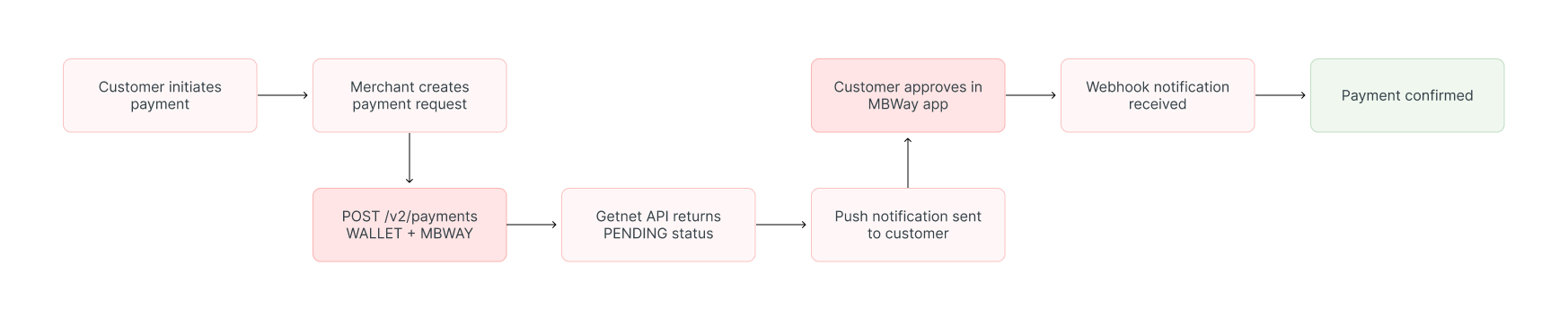
After you create the payment request, a push notification is sent to the customer's device. The customer opens the MB WAY app to approve or decline the payment. Status updates are delivered asynchronously through webhooks or can be retrieved using the Get Transaction endpoint.
Available features
Use the matrix below to confirm the scenarios currently supported for MB WAY.
| Payment flow | Supported countries | Purchases | Refunds | Partial refunds | Multiple refunds | Pre-authorizations |
|---|---|---|---|---|---|---|
| Wallet | Portugal | ✅ | ✅ | ✅ | ✅ | ❌ |
Payment flow
This section guides you through the complete process of implementing MB WAY payments, from collecting the customer's phone number to handling the payment response, expiration, and webhook notifications.
The diagram below provides an overview of an MB WAY payment:
1. Create the payment request
As MB WAY uses an asynchronous wallet payment flow, you must first implement a payment form on your frontend to collect the customer's MB WAY-enabled phone number.
Once collected, call the Create – Authorize endpoint with the attributes below.
The table outlines the minimum fields required for an MB WAY payment.
| Attribute | Description | Required value |
|---|---|---|
idempotency_key | Unique identifier used to prevent duplicate processing | UUID |
request_id | Unique identifier used to trace the request | UUID |
order_id | Merchant reference used for reconciliation | Unique string. Must be unique and have a maximum of 35 characters. |
data.amount | Transaction amount in cents | Integer, for example 5000 for €50.00 |
data.currency | ISO 4217 currency code | EUR |
data.payment.payment_method | Wallet payment method | WALLET |
data.payment.brand | MB WAY brand identifier | MBWAY |
data.additional_data.customer.phone_number | Customer's MB WAY-enabled phone number | countryCode#phoneNumber |
Phone number format: UsecountryCode#phoneNumber, for example351#912345678. Do not include the+symbol, spaces, parentheses, or hyphens. The country code must contain between 1 and 4 digits, and the phone number must contain between 6 and 15 digits.
Valid example:
Invalid examples:
The following sample request shows how to initialize an MB WAY payment using only the minimum required customer information.
curl --request POST \
  --url https://api.pre.globalgetnet.com/dpm/payments-gwproxy/v2/payments \
  --header 'Authorization: Bearer <your-token>' \
  --header 'Content-Type: application/json' \
  --data '{
    "idempotency_key": "5befb59b-85be-46cd-b924-ec77f5b75d5c",
    "request_id": "c4045e74-ef2e-4f8b-a30d-6ba63c57b407",
    "order_id": "MBWAY-20260415-00001",
    "data": {
      "amount": 5000,
      "currency": "EUR",
      "payment": {
        "payment_method": "WALLET",
        "brand": "MBWAY"
      },
      "additional_data": {
        "customer": {
          "phone_number": "351#912345678"
        }
      }
    }
}'curl --request POST \
--url https://api.pre.globalgetnet.com/dpm/payments-gwproxy/v2/payments \
--header 'Authorization: Bearer <your-token>' \
--header 'Content-Type: application/json' \
--data '{
"idempotency_key": "5befb59b-85be-46cd-b924-ec77f5b75d5c",
"request_id": "c4045e74-ef2e-4f8b-a30d-6ba63c57b407",
"order_id": "MBWAY-20260415-00001",
"data": {
"amount": 5000,
"currency": "EUR",
"payment": {
"payment_method": "WALLET",
"brand": "MBWAY"
},
"additional_data": {
"customer": {
"phone_number": "351#912345678"
}
}
}
}'You can also include additional customer, billing, and shipping information when required by risk, compliance, fraud prevention, or local configuration.
curl --request POST \
  --url https://api.pre.globalgetnet.com/dpm/payments-gwproxy/v2/payments \
  --header 'Authorization: Bearer <your-token>' \
  --header 'Content-Type: application/json' \
  --data '{
    "idempotency_key": "5befb59b-85be-46cd-b924-ec77f5b75d5c",
    "request_id": "c4045e74-ef2e-4f8b-a30d-6ba63c57b407",
    "order_id": "MBWAY-20260415-00001",
    "data": {
      "amount": 5000,
      "currency": "EUR",
      "payment": {
        "payment_method": "WALLET",
        "brand": "MBWAY"
      },
      "additional_data": {
        "customer": {
          "email": "customer@example.com",
          "document_number": "123456789",
          "document_type": "nif",
          "name": "Jose da Silva",
          "phone_number": "351#912345678",
          "billing_address": {
            "street": "Avenida da Liberdade",
            "number": "10",
            "complement": "2A",
            "district": "Santo Antonio",
            "city": "Lisbon",
            "state": "Lisbon",
            "country": "PT",
            "postal_code": "1250-096"
          }
        },
        "shippings": {
          "address": {
            "street": "Avenida da Liberdade",
            "number": "10",
            "complement": "2A",
            "district": "Santo Antonio",
            "city": "Lisbon",
            "state": "Lisbon",
            "country": "PT",
            "postal_code": "1250-096"
          }
        }
      }
    }
}'curl --request POST \
--url https://api.pre.globalgetnet.com/dpm/payments-gwproxy/v2/payments \
--header 'Authorization: Bearer <your-token>' \
--header 'Content-Type: application/json' \
--data '{
"idempotency_key": "5befb59b-85be-46cd-b924-ec77f5b75d5c",
"request_id": "c4045e74-ef2e-4f8b-a30d-6ba63c57b407",
"order_id": "MBWAY-20260415-00001",
"data": {
"amount": 5000,
"currency": "EUR",
"payment": {
"payment_method": "WALLET",
"brand": "MBWAY"
},
"additional_data": {
"customer": {
"email": "customer@example.com",
"document_number": "123456789",
"document_type": "nif",
"name": "Jose da Silva",
"phone_number": "351#912345678",
"billing_address": {
"street": "Avenida da Liberdade",
"number": "10",
"complement": "2A",
"district": "Santo Antonio",
"city": "Lisbon",
"state": "Lisbon",
"country": "PT",
"postal_code": "1250-096"
}
},
"shippings": {
"address": {
"street": "Avenida da Liberdade",
"number": "10",
"complement": "2A",
"district": "Santo Antonio",
"city": "Lisbon",
"state": "Lisbon",
"country": "PT",
"postal_code": "1250-096"
}
}
}
}
}'The API responds with a payload similar to the example below.
{
  "idempotency_key": "5befb59b-85be-46cd-b924-ec77f5b75d5c",
  "seller_id": "2ee453aa-3ab6-447b-becf-d9d4360051eb",
  "payment_id": "32f5b40-466c-4640-ad32-5a62f7dd0173",
  "order_id": "MBWAY-20260415-00001",
  "amount": "5000",
  "currency": "EUR",
  "status": "WAITING",
  "received_at": "2026-04-15T17:52:55.422Z",
  "transaction_id": "MBWAY-20260415-00001",
  "reason_code": "00",
  "reason_message": "Pending",
  "acquirer_transaction_id": "s23iDV9z9GUwpS11Hm9j"
}{
"idempotency_key": "5befb59b-85be-46cd-b924-ec77f5b75d5c",
"seller_id": "2ee453aa-3ab6-447b-becf-d9d4360051eb",
"payment_id": "32f5b40-466c-4640-ad32-5a62f7dd0173",
"order_id": "MBWAY-20260415-00001",
"amount": "5000",
"currency": "EUR",
"status": "WAITING",
"received_at": "2026-04-15T17:52:55.422Z",
"transaction_id": "MBWAY-20260415-00001",
"reason_code": "00",
"reason_message": "Pending",
"acquirer_transaction_id": "s23iDV9z9GUwpS11Hm9j"
}The table below describes the main response fields.
| Attribute | Description |
|---|---|
payment_id | Payment identifier used to query the payment status and correlate asynchronous updates |
order_id | Merchant order reference used for reconciliation |
amount | Transaction amount in cents |
currency | Transaction currency. For MB WAY, this value is EUR |
status | Current payment status. The initial successful response returns WAITING |
received_at | Date and time when the payment request was received |
transaction_id | Transaction identifier associated with the payment |
reason_code | Processing reason code returned by the API |
reason_message | Human-readable description associated with the processing status |
acquirer_transaction_id | Transaction identifier assigned by the acquirer or payment provider |
Use thestatusfield to determine the payment lifecycle. Do not usereason_codealone to decide whether the order can be fulfilled.
2. Customer approval flow
After the API call, the following sequence occurs:
- Payment request: Getnet creates the payment and returns the initial
WAITINGstatus. - Push notification: MB WAY sends a notification to the customer's registered mobile device.
- MB WAY app: The customer opens the MB WAY app and reviews the merchant and payment information.
- Customer action:
- Approves payment → Status becomes
APPROVEDand anAPPROVED_TRANSACTIONSwebhook event is sent. - Declines or rejects payment → Status becomes
DECLINEDand aREJECTED_TRANSACTIONSwebhook event is sent. - Does not respond within 4 minutes and 30 seconds → The notification expires and a
REJECTED_TRANSACTIONSwebhook event can be sent.
- Approves payment → Status becomes
- Payment confirmation: Getnet receives the result and updates the payment status asynchronously.
- Order fulfillment: The merchant fulfills the order only after confirming the final
APPROVEDstatus.
The customer has 4 minutes and 30 seconds from the creation of the payment intent to authorize the payment. The countdown starts when the payment intent is successfully created, not when the customer opens the MB WAY app.
3. Handle payment expiration
The customer must approve the payment through the MB WAY app within this period. After the notification expires, the customer can no longer use that payment request to complete the authorization.
If the payment is not completed within the authorization period:
- Do not fulfill the order.
- Wait for the final payment status through a webhook or query the Get Transaction endpoint.
- Create a new payment request if the customer wants to try again.
Important: Do not assume that the payment failed only because the checkout countdown ended. Always confirm the final transaction status through a webhook or the Get Transaction endpoint.
4. Verify payment status
When the customer approves, declines, or does not complete the payment, a webhook notification is sent with the updated payment status.
You can also check the payment status using the Get Transaction endpoint.
payment_id returned in the initial response.curl --request GET \
--url https://api.pre.globalgetnet.com/dpm/hub-payment-info/v1/payments/info/{payment_id} \
--header 'Authorization: Bearer <your-token>'curl --request GET \
--url https://api.pre.globalgetnet.com/dpm/hub-payment-info/v1/payments/info/{payment_id} \
--header 'Authorization: Bearer <your-token>'Use status polling as a fallback when:
- Webhook delivery is delayed.
- The merchant does not receive a webhook.
- The customer returns to the checkout before the final webhook is processed.
- The merchant needs to reconcile an uncertain payment result.
Avoid excessive polling. Use an appropriate interval and stop polling after receiving a final payment status.
Webhooks
Use webhooks to receive asynchronous status updates for MB WAY payments. Webhooks are recommended for production integrations, while status polling should only be used as a fallback.
To learn how to configure and receive webhook notifications, see the Webhooks guide.
| Event | Description |
|---|---|
PENDING_TRANSACTIONS | Sent when the payment request is created and is awaiting customer authorization |
APPROVED_TRANSACTIONS | Sent when the customer successfully approves the payment through the MB WAY app |
REJECTED_TRANSACTIONS | Sent when the payment is declined, rejected, expires, or cannot be authorized |
CANCELLED_TRANSACTIONS | Sent when the payment is cancelled before completion |
Webhook events may be delivered more than once. Process each notification idempotently and use thepayment_idto correlate the event with the original payment request.
Your webhook implementation should:
- Validate the webhook according to the security mechanism described in the Webhooks guide.
- Return a successful HTTP response after processing the event.
- Support repeated delivery of the same event.
- Process notifications idempotently.
- Use
payment_idororder_idto correlate the notification with the original payment. - Retrieve the transaction through the Get Transaction endpoint when the result is uncertain.
Status reference
The table below describes the expected status lifecycle for MB WAY payments and the corresponding webhook events.
| Status | Webhook event | Description | Next action |
|---|---|---|---|
WAITING | PENDING_TRANSACTIONS | Payment request created successfully and awaiting customer authorization | Ask the customer to open the MB WAY app and await the webhook or poll the Get Transaction endpoint |
APPROVED | APPROVED_TRANSACTIONS | Customer approved the payment successfully through the MB WAY app | Fulfill the order and record the payment for reconciliation |
DECLINED | REJECTED_TRANSACTIONS | Payment was declined, rejected or expired | Do not fulfill the order. |
CANCELLED | CANCELLED_TRANSACTIONS | Payment was cancelled before completion | Record the cancellation and stop fulfillment |
Treat onlyAPPROVEDas confirmation that the payment was successfully completed.
Refunds and cancellations
MB WAY payments support both cancellations and refunds:
- Cancellations: Available for eligible same-day transactions before the applicable daily cutoff time. Only full cancellations are supported.
- Refunds: Available for eligible transactions after settlement. Full refunds, partial refunds, and multiple refunds are supported.
- Refund period: Refunds can be requested for up to 15 months from the original payment date.
The accumulated refunded amount must not exceed the original payment amount.
To process a refund or cancellation, follow the instructions in the Refund a Payment guide.
For detailed information about eligibility, settlement requirements, cutoff times, and country-specific availability, refer to the payment method availability reference.
Best practices
Follow these recommendations when implementing MB WAY:
- Collect the phone number using the
countryCode#phoneNumberformat. - Validate the phone number format before sending the request.
- Clearly instruct the customer to open the MB WAY app after the payment is created.
- Keep the checkout page available while the payment is awaiting customer authorization.
- Display a countdown based on the 4-minute-and-30-second authorization period.
- Start the countdown when the payment intent is successfully created, not when the customer opens the MB WAY app.
- Do not automatically classify the payment as declined when the checkout countdown ends.
- Confirm the final status through a webhook or the Get Transaction endpoint.
- Create a new payment request if the notification expires and the customer wants to retry.
- Do not fulfill the order while the status is
WAITING. - Use webhooks in production and status polling only as a fallback.
- Process webhook events idempotently because the same notification may be delivered more than once.
- Store
payment_id,order_id,transaction_id,amount, and the final payment status for reconciliation. - Use a unique
idempotency_keyfor every payment attempt. - Do not reuse an idempotency key with different request data.
- Ensure refund workflows enforce the maximum period of 15 months from the original payment date.
- Allow the customer to select another payment method when the payment is declined or cannot be completed.
Read more
- Review Authentication for token management and security best practices.
- Review the Get Transaction endpoint to check the payment status.
- Review the Webhooks guide for asynchronous payment notifications.
- Review the Refund a Payment guide for refund and cancellation instructions.
On this page