Refund a Payment
This guide explains how to process refunds and cancellations for previously authorized payments using the Getnet Regional API. Depending on when the refund is requested, the system handles it differently: same-day refunds are processed as cancellations (voiding the transaction before settlement), while next-day refunds are processed as adjustments (after settlement has occurred).
Requirements
Before following the steps, you need to:
- Create your account by contacting the Integration Support team to get your API credentials
client_idandclient_secret. - Generate your token with your credentials using the Authentication endpoint.
- Have a previously authorized or captured payment that you want to refund.
Getnet provides a Postman Collection to help you to replicate these use cases locally. You can also test the API in sandbox using the API Reference available in the documentation.

Use Cases Specifics
When integrating any Getnet solution, market-specific requirements apply. Be sure to review the resources below before you go live:
You can also use test cards to simulate specific scenarios. More information about specific requirements for each country can be found in the Developer Resources section of the Getnet documentation.
Platform availability
Refund and cancellation support varies by country, card brand and payment method. For a complete reference of supported card schemes and specific rules for each market, see Cancellations and Refunds Availability.
Understanding Refund Timing
The Getnet Regional API handles refunds differently based on when they are requested relative to the original transaction:
Same-Day Cancellations (D+0)
- Only full refunds are allowed (partial refunds not supported)
- Transaction is voided before settlement
- Faster processing as the funds never leave the customer's account
Important: Transactions authorized very close to the cutoff time may require 20 to 30 minutes for full confirmation. In such cases, make the cancellation request after the cutoff time has passed to ensure it's properly processed.
For country-specific cutoff times and availability, see the Core Cards reference.
Next-Day Refunds (D+1 or Later)
- Both full and partial refunds are allowed (subject to country availability)
- Processed as a separate refund transaction through the settlement system
- May take longer to reflect in the customer's account
For country-specific information about partial refund availability, see the Core Cards reference.
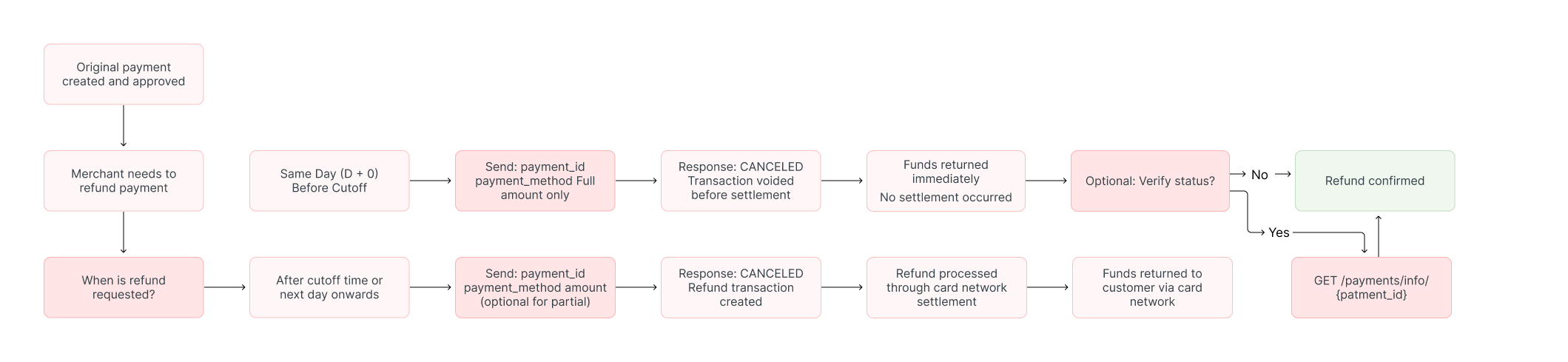
The diagram below illustrates the refund flow, showing the different paths for same-day cancellations versus next-day refunds:
Refund Payment Process
This section guides you through the process of refunding a payment transaction.
The table below lists the minimum fields you need to send:
| Attribute | Type | Description | Example |
|---|---|---|---|
idempotency_key | String | Unique identifier to prevent duplicate operations. | 63c7f8ee-51a6-470d-bb76-ef762b62bfb7 |
payment_id | String | The payment identifier from the original transaction response. | 2c341d28-491b-4cf8-aec7-eeb60136b7a5 |
payment_method | String | The payment method used in the original transaction. | CREDIT |
amount | Integer | Value (less than or equal) of the purchase in cents. | 118708 |
Partial Refunds: Theamountfield allows you to specify a partial refund amount (equal to or less than the original transaction). However, partial refunds are only available from D+1 onwards and availability varies by country. For country-specific information, see the Core Cards reference.
Step 1: Request the Refund or Cancellation
Despite the endpoint name, this endpoint handles both same-day cancellations and next-day refunds automatically based on the timing.
To process a refund or cancellation, use the Cancel Payment endpoint.
curl --request POST \
  --url https://api-sbx.globalgetnet.com/dpm/payments-gwproxy/v2/payments/cancel \
  --header 'authorization: Bearer ' \
  --header 'content-type: application/json' \
  --data '{
  "idempotency_key": "a1b2c3d4-e5f6-4789-abcd-ef1234567890",
  "payment_id": "053de7f9-3725-437b-bdfc-bbf3ed0acb75",
  "payment_method": "CREDIT"
}'curl --request POST \
--url https://api-sbx.globalgetnet.com/dpm/payments-gwproxy/v2/payments/cancel \
--header 'authorization: Bearer ' \
--header 'content-type: application/json' \
--data '{
"idempotency_key": "a1b2c3d4-e5f6-4789-abcd-ef1234567890",
"payment_id": "053de7f9-3725-437b-bdfc-bbf3ed0acb75",
"payment_method": "CREDIT"
}'curl --request POST \
--url https://api-sbx.globalgetnet.com/dpm/payments-gwproxy/v2/payments/cancel \
--header 'authorization: Bearer ' \
--header 'content-type: application/json' \
--data '{
"idempotency_key": "b2c3d4e5-f6a7-5890-bcde-fg2345678901",
"payment_id": "053de7f9-3725-437b-bdfc-bbf3ed0acb75",
"payment_method": "CREDIT",
"amount": 50000
}'curl --request POST \
--url https://api-sbx.globalgetnet.com/dpm/payments-gwproxy/v2/payments/cancel \
--header 'authorization: Bearer ' \
--header 'content-type: application/json' \
--data '{
"idempotency_key": "b2c3d4e5-f6a7-5890-bcde-fg2345678901",
"payment_id": "053de7f9-3725-437b-bdfc-bbf3ed0acb75",
"payment_method": "CREDIT",
"amount": 50000
}'{
"idempotency_key": "a1b2c3d4-e5f6-4789-abcd-ef1234567890",
"seller_id": "e0ed6f00-fdc5-46d6-9557-6a2cac641b09",
"payment_id": "053de7f9-3725-437b-bdfc-bbf3ed0acb75",
"order_id": "ORDER-10187383",
"amount": 118708,
"currency": "BRL",
"status": "CANCELED",
"reason_code": "00",
"reason_message": "Cancellation successful",
"canceled_at": "2025-10-31T14:30:25.166Z"
}{
"idempotency_key": "a1b2c3d4-e5f6-4789-abcd-ef1234567890",
"seller_id": "e0ed6f00-fdc5-46d6-9557-6a2cac641b09",
"payment_id": "053de7f9-3725-437b-bdfc-bbf3ed0acb75",
"order_id": "ORDER-10187383",
"amount": 118708,
"currency": "BRL",
"status": "CANCELED",
"reason_code": "00",
"reason_message": "Cancellation successful",
"canceled_at": "2025-10-31T14:30:25.166Z"
}{
"idempotency_key": "a1b2c3d4-e5f6-4789-abcd-ef1234567890",
"seller_id": "e0ed6f00-fdc5-46d6-9557-6a2cac641b09",
"payment_id": "053de7f9-3725-437b-bdfc-bbf3ed0acb75",
"order_id": "ORDER-10187383",
"amount": 118708,
"currency": "BRL",
"status": "DENIED",
"reason_code": "05",
"reason_message": "Cancellation not allowed - transaction already settled"
}{
"idempotency_key": "a1b2c3d4-e5f6-4789-abcd-ef1234567890",
"seller_id": "e0ed6f00-fdc5-46d6-9557-6a2cac641b09",
"payment_id": "053de7f9-3725-437b-bdfc-bbf3ed0acb75",
"order_id": "ORDER-10187383",
"amount": 118708,
"currency": "BRL",
"status": "DENIED",
"reason_code": "05",
"reason_message": "Cancellation not allowed - transaction already settled"
}Step 2: Verify the Refund Status
status field in the response:CANCELED: The refund was successfully processedDENIED: The refund was rejected
reason_code and reason_message fields for more details about why the refund failed.You can also query the transaction status at any time using the Get Transaction endpoint. For real-time updates, it is recommended to use Webhooks to receive notifications for every status change.
Refunding Combined Payments
Combined payments require special handling when processing refunds:
- Cancellation is available for confirmed transactions made more than 1 day ago.
- Combined payments with credit cards can be cancelled through a request that includes the same number of payment objects as sent in the previous authorization request.
- Depending on the authorization status of the current transaction, cancellation can be reversed on the same day (already confirmed) or within 7 days (already authorized).
To cancel a combined payment, use the Combined Payments - Cancel endpoint instead of the regular cancel endpoint.
Best Practices
When processing refunds, follow these best practices:
- Be aware of the daily cutoff times for your market to understand whether your refund will be processed as a same-day cancellation or next-day refund.
- Remember that partial refunds are only available from D+1 onwards and availability varies by country. Check the Core Cards reference for country-specific information.
- Always use a unique
idempotency_keyfor each refund request to prevent accidental duplicate refunds. - Use webhooks to receive real-time updates about refund processing rather than repeatedly polling the API.
- Keep the
payment_id,payment_method, andamountfrom the original transaction to facilitate refund processing.
Next Steps
Now that you understand how to refund payments, you can explore more features of the Getnet Regional API:
- Learn how to create Combined Payments.
- Learn how to create Payments with Installments.
- Explore Webhooks to receive real-time transaction updates.
- Understand the Transaction Lifecycle in detail.
On this page