Multibanco

Unlike redirect-based payment methods, Multibanco does not redirect the customer to an external checkout page. The merchant is responsible for displaying the payment instructions returned by the API.
Important: Multibanco is asynchronous. The initial API response returnsWAITINGwith the paymententityandreference. This means the reference was created successfully, but the payment has not been completed yet. By default, the reference expires in D+7. The final payment status is received via webhook or by polling the Get Transaction endpoint.

Payment Methods Available
Customers can complete a Multibanco payment through the following channels:
- ATM — Multibanco Terminal: the customer enters the entity, reference, and amount, then confirms the payment.
- Online Banking: the customer accesses Multibanco payments and enters the entity, reference, and amount.
- Mobile Banking App: the customer enters or scans the payment information and authorizes the payment.
Requirements
Before integrating Multibanco:
- Generate an access token through the Authentication endpoint.
- Make sure your seller account is enabled for Multibanco.
- Implement webhook event handling or status polling to receive asynchronous payment updates.
- Display the payment information returned by the API to the customer.
Multibanco is only available in Portugal and only supportsEURcurrency. Contact your Account Manager to enable this payment method for your seller account.
Use Cases Specifics
When integrating any Getnet solution, market-specific requirements apply. Multibanco is only available in Portugal and only for EUR currency. Review the resources below before going live:
Shared Characteristics
The table below summarizes the behavior and requirements for Multibanco payment flows.
| Capability | Details |
|---|---|
| Integration type | Reference-based payment method with no customer redirect. |
| Customer experience | Merchant displays the payment entity, reference, and amount returned by the API. The customer pays asynchronously using ATM, online banking, or mobile banking. |
| Initial status | The initial response returns WAITING after the payment reference is created. |
| Confirmation | Asynchronous. The payment is completed only after the customer pays using one of the supported Multibanco channels. |
| Expiration time | By default, the Multibanco payment reference expires in D+7, meaning seven calendar days after the reference is created. |
| Notifications | Webhooks or status polling can be used to track asynchronous status updates. |
| Currency | EUR only. |
| Country availability | Portugal only. |
Available Features
Use the matrix below to confirm the scenarios currently supported for Multibanco.
| Payment flow | Supported countries | Purchases | Refunds | Partial refunds | Pre-authorizations |
|---|---|---|---|---|---|
| Direct | Portugal | ✅ | ✅ | ✅ | ❌ |
Request Structure
All Multibanco payment requests use the same top-level body structure and the same endpoint. The table below documents the minimum fields required to create a Multibanco payment reference.
| Field | Type | Required | Description |
|---|---|---|---|
idempotency_key | String UUID | Yes | Unique identifier to ensure the request is processed only once. |
request_id | String UUID | Yes | Unique identifier for tracking the request across systems. |
order_id | String | Yes | Merchant order reference used for reconciliation. Must be unique and have a maximum of 35 characters. |
data.amount | Integer | Yes | Transaction amount in cents. For example, 200 represents €2.00. |
data.currency | String | Yes | ISO 4217 currency code. Must be EUR. |
data.payment.payment_id | String UUID | Yes | Merchant-defined payment identifier. |
data.payment.payment_method | String | Yes | Must be CASH_PAYMENT. |
data.payment.brand | String | Yes | Must be MULTIBANCO. |
data.additional_data.customer | Object | No | Optional customer data object. Merchants may send it when they want to provide additional customer information or when required by risk, compliance, or local configuration. |
Note: Theorder_idmust be unique and must not exceed 35 characters.
Note: Customer data is optional for Multibanco. Merchants may send theadditional_data.customerobject when needed, but it is not required in the minimum payment request.
Optional Customer Fields
| Field | Type | Required | Description |
|---|---|---|---|
data.additional_data.customer.email | String | No | Customer's email address. |
data.additional_data.customer.document_number | String | No | Customer's identification document number. |
data.additional_data.customer.document_type | String | No | Customer's document type. For Portugal, use the applicable document type such as nif, when required. |
data.additional_data.customer.name | String | No | Customer's full name. |
data.additional_data.customer.phone_number | String | No | Customer's phone number. |
data.additional_data.customer.billing_address | Object | No | Customer's billing address. |
data.additional_data.customer.shippings.address | Object | No | Customer's shipping address. |
Billing Address Fields
| Field | Type | Description |
|---|---|---|
street | String | Street name. |
number | String | Building number. |
complement | String | Additional address details, such as apartment or suite. |
district | String | Neighborhood or district. |
city | String | City name. |
state | String | State, region, or province. |
country | String | ISO 3166-1 alpha-2 country code. For Portugal, use PT. |
postal_code | String | Postal or ZIP code. |
Payment Flow
The lifecycle of a Multibanco payment begins when the merchant creates a payment request and receives a payment reference. The customer then uses the returned payment information to complete the payment through a supported banking channel.
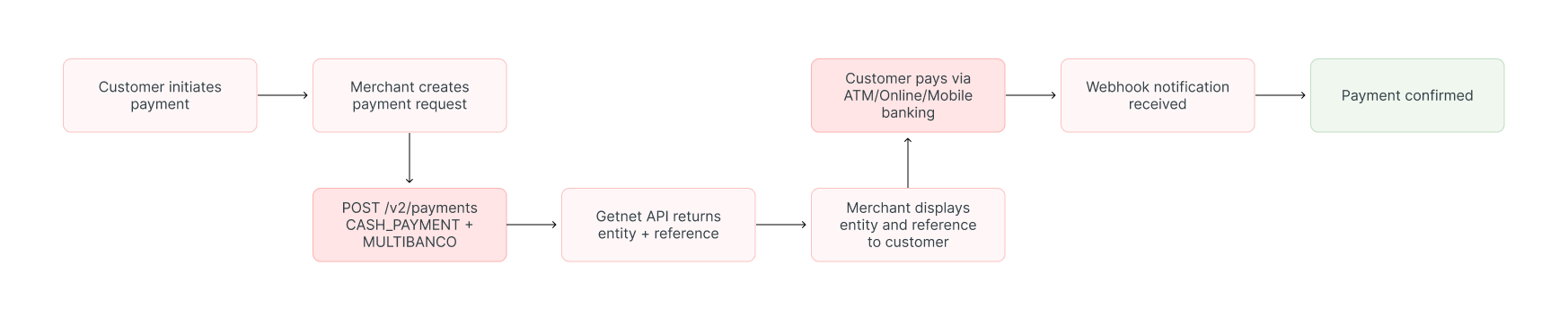
Flow Description
- The customer selects Multibanco as the payment method at checkout.
- The merchant creates a Multibanco payment request through the API.
- Getnet returns a
WAITINGresponse with the Multibancoentityandreference. - The merchant displays the payment instructions to the customer.
- The customer pays using ATM, online banking, or mobile banking.
- Getnet receives the payment confirmation.
- Getnet updates the payment status and sends a webhook notification, or the merchant checks the status using the Get Transaction endpoint.
- The merchant fulfills the order after confirming the final approved status.
Create a Multibanco Payment
To create a Multibanco payment, call the Create - Authorize endpoint and set:
payment_methodtoCASH_PAYMENTbrandtoMULTIBANCOcurrencytoEUR
Minimum Request
curl --request POST \
  --url https://api.pre.globalgetnet.com/dpm/payments-gwproxy/v2/payments \
  --header 'Authorization: Bearer <your-token>' \
  --header 'Content-Type: application/json' \
  --data '{
  "idempotency_key": "{{$randomUUID}}",
  "request_id": "{{$guid}}",
  "order_id": "weyibwej",
  "data": {
    "amount": 200,
    "currency": "EUR",
    "payment": {
      "payment_id": "{{$guid}}",
      "payment_method": "CASH_PAYMENT",
      "brand": "MULTIBANCO"
    }
  }
}'curl --request POST \
--url https://api.pre.globalgetnet.com/dpm/payments-gwproxy/v2/payments \
--header 'Authorization: Bearer <your-token>' \
--header 'Content-Type: application/json' \
--data '{
"idempotency_key": "{{$randomUUID}}",
"request_id": "{{$guid}}",
"order_id": "weyibwej",
"data": {
"amount": 200,
"currency": "EUR",
"payment": {
"payment_id": "{{$guid}}",
"payment_method": "CASH_PAYMENT",
"brand": "MULTIBANCO"
}
}
}'Request with Optional Customer Data
additional_data.customer object when they want to send additional customer information.curl --request POST \
--url https://api.pre.globalgetnet.com/dpm/payments-gwproxy/v2/payments \
--header 'Authorization: Bearer <your-token>' \
--header 'Content-Type: application/json' \
--data '{
"idempotency_key": "{{$randomUUID}}",
"request_id": "{{$guid}}",
"order_id": "weyibwej",
"data": {
"amount": 200,
"currency": "EUR",
"payment": {
"payment_id": "{{$guid}}",
"payment_method": "CASH_PAYMENT",
"brand": "MULTIBANCO"
},
"additional_data": {
"customer": {
"email": "customer@example.com",
"document_number": "123456789",
"document_type": "nif",
"name": "Jose da Silva",
"phone_number": "351912345678",
"billing_address": {
"street": "Avenida da Liberdade",
"number": "10",
"complement": "2A",
"district": "Santo Antonio",
"city": "Lisbon",
"state": "Lisbon",
"country": "PT",
"postal_code": "1250-096"
},
"shippings": {
"address": {
"street": "Avenida da Liberdade",
"number": "10",
"complement": "2A",
"district": "Santo Antonio",
"city": "Lisbon",
"state": "Lisbon",
"country": "PT",
"postal_code": "1250-096"
}
}
}
}
}
}'curl --request POST \
--url https://api.pre.globalgetnet.com/dpm/payments-gwproxy/v2/payments \
--header 'Authorization: Bearer <your-token>' \
--header 'Content-Type: application/json' \
--data '{
"idempotency_key": "{{$randomUUID}}",
"request_id": "{{$guid}}",
"order_id": "weyibwej",
"data": {
"amount": 200,
"currency": "EUR",
"payment": {
"payment_id": "{{$guid}}",
"payment_method": "CASH_PAYMENT",
"brand": "MULTIBANCO"
},
"additional_data": {
"customer": {
"email": "customer@example.com",
"document_number": "123456789",
"document_type": "nif",
"name": "Jose da Silva",
"phone_number": "351912345678",
"billing_address": {
"street": "Avenida da Liberdade",
"number": "10",
"complement": "2A",
"district": "Santo Antonio",
"city": "Lisbon",
"state": "Lisbon",
"country": "PT",
"postal_code": "1250-096"
},
"shippings": {
"address": {
"street": "Avenida da Liberdade",
"number": "10",
"complement": "2A",
"district": "Santo Antonio",
"city": "Lisbon",
"state": "Lisbon",
"country": "PT",
"postal_code": "1250-096"
}
}
}
}
}
}'Response
WAITING status and the Multibanco payment information in additional_data.{
"idempotency_key": "9aea3042-42db-4b24-958d-e59ff17cbff9",
"seller_id": "6f42ca7f-be26-42b7-b25e-f8ccd496a05b",
"payment_id": "3b4129f9-43c3-4eed-baaf-7364ccb0a8c5",
"order_id": "weyibwej",
"amount": "200",
"currency": "EUR",
"status": "WAITING",
"received_at": "2026-07-10T15:49:31.286Z",
"reason_code": "00",
"reason_message": "Pending",
"acquirer_transaction_id": "775882357",
"additional_data": {
"reference": "775882357",
"entity": "53492"
}
}{
"idempotency_key": "9aea3042-42db-4b24-958d-e59ff17cbff9",
"seller_id": "6f42ca7f-be26-42b7-b25e-f8ccd496a05b",
"payment_id": "3b4129f9-43c3-4eed-baaf-7364ccb0a8c5",
"order_id": "weyibwej",
"amount": "200",
"currency": "EUR",
"status": "WAITING",
"received_at": "2026-07-10T15:49:31.286Z",
"reason_code": "00",
"reason_message": "Pending",
"acquirer_transaction_id": "775882357",
"additional_data": {
"reference": "775882357",
"entity": "53492"
}
}Response Fields
| Field | Description |
|---|---|
payment_id | Payment identifier used to query the payment status. |
order_id | Merchant order reference used for reconciliation. Maximum of 35 characters. |
amount | Transaction amount in cents. |
currency | Transaction currency. For Multibanco, this must be EUR. |
status | Initial payment status. For a successfully created Multibanco reference, this returns WAITING. |
acquirer_transaction_id | Acquirer transaction identifier. |
additional_data.entity | Multibanco entity code that must be displayed to the customer. |
additional_data.reference | Multibanco payment reference that must be displayed to the customer. |
Display the Payment Reference
After creating the payment request, display the Multibanco payment information returned by the API response.
| Field | Source |
|---|---|
| Entity | additional_data.entity |
| Reference | additional_data.reference |
| Amount | amount |
Example:
Important: Do not generate, alter, truncate, or reformat the Multibancoentityorreference. Always display the values exactly as returned by the API.
Expiration Time
The customer must complete the payment before the expiration date. If the customer does not pay within this period, the reference is no longer valid and the merchant should ask the customer to create a new payment.
Handle the Asynchronous Status
WAITING status means the payment reference was created successfully and is waiting for the customer to complete the payment.The payment is not completed until the customer pays through ATM, online banking, or mobile banking. Once the payment is completed, the payment status is updated asynchronously.
Use one of the following options to track the payment result:
- Webhooks: recommended for production integrations.
- Status polling: use the Get Transaction endpoint as a fallback.
Do not fulfill the order based only on the initialWAITINGresponse. Fulfill the order only after receiving the final approved status.
Verify Payment Status
To verify the payment status, use the Get Transaction endpoint.
payment_id returned in the initial response.curl --request GET \
--url https://api.pre.globalgetnet.com/dpm/hub-payment-info/v1/payments/info/{payment_id} \
--header 'Authorization: Bearer <your-token>'curl --request GET \
--url https://api.pre.globalgetnet.com/dpm/hub-payment-info/v1/payments/info/{payment_id} \
--header 'Authorization: Bearer <your-token>'A successful payment status response returns the final payment status. Use this endpoint as a fallback if webhook delivery is delayed or unavailable.
Webhooks
Use webhooks to receive asynchronous status updates for Multibanco payments. Webhooks are recommended for production integrations, while status polling should be used only as a fallback.
To learn how to configure and receive webhook notifications, see the Webhooks guide.
| Event | Description |
|---|---|
PENDING_TRANSACTIONS | Sent when the payment reference is created and waiting for customer payment. |
APPROVED_TRANSACTIONS | Sent when the customer completes the Multibanco payment successfully. |
CANCELLED_TRANSACTIONS | Sent when the payment is cancelled. |
Status Reference
The table below describes the expected status lifecycle for Multibanco payments.
| Status | Description | Next action |
|---|---|---|
WAITING | Payment reference created successfully. The customer has not completed the payment yet. | Display entity, reference, and amount; await webhook event or poll the Get Transaction endpoint. |
APPROVED | Customer completed the payment through ATM, online banking, or mobile banking. | Fulfill the order and record the payment for reconciliation. |
CANCELLED | Payment was cancelled before completion. | Record the cancellation and stop fulfillment. |
Refunds and Cancellations
Multibanco payments support both cancellations and refunds:
- Cancellations: Available for same-day transactions before the daily cutoff time. Both full and partial cancellations are supported.
- Refunds: Available for transactions after settlement. Both full and partial refunds are supported.
To process a refund or cancellation, follow the instructions in the Refund a Payment guide.
For detailed information about refund timing, cutoff times, and country-specific availability, refer to the Core Cards reference.
Best Practices
Follow these recommendations when implementing Multibanco:
- Use a unique
order_idwith a maximum of 35 characters. - Display the
entity,reference, andamountexactly as returned by the API. - Inform the customer that the Multibanco reference expires in D+7 by default.
- Do not fulfill the order while the payment status is
WAITING. - Use webhooks in production and status polling only as a fallback.
- Store
payment_id,order_id,entity,reference, andamountfor reconciliation.
Read More
- Review Authentication for token management and security best practices.
- Review the Get Transaction endpoint to check payment status.
- Review the Refund a Payment guide for refund and cancellation instructions.
On this page