Nequi
Payment Methods Available
payment_method field:- Nequi QR (
WALLET): The API returns aredirect_url. The merchant can redirect the customer to this URL or render it as a QR code for the customer to scan using the Nequi app. - Nequi Push (
WALLET_PUSH): The merchant triggers a push notification to the customer's phone number. The customer accepts the payment directly within the Nequi app.
Requirements
Before integrating Nequi, you need to:
- Generate an access token through the Authentication endpoint.
- Configure a public HTTPS
callback_urlto receive asynchronous status updates when the customer completes or rejects the payment. - Ensure that the merchant account is configured for Colombia (CO) and COP currency.
- For Payouts: Ensure your merchant account has sufficient balance to cover the disbursement amount.
Use Cases Specifics
Characteristics
The table below summarizes the behavior and requirements for Nequi payment flows.
| Capability | Details |
|---|---|
| Customer experience | QR Flow: Customer scans a code generated from the redirect URL. Push Flow: Customer receives a notification on their phone to approve. |
| Confirmation | Asynchronous — A webhook notification informs the merchant when the payment is approved or rejected. |
| Idempotency & uniqueness | Each request must include a unique idempotency_key. |
Available features
Use the matrix below to confirm the scenarios currently supported for Nequi.
| Payment flow | Supported countries | Purchases | Refunds | Partial refunds | Pre-authorizations | Recurring payments | Payouts |
|---|---|---|---|---|---|---|---|
| Direct (QR / Push) | Colombia | ✅ | ✅ | ✅ | ❌ | ✅ | ✅ |
Payment flow
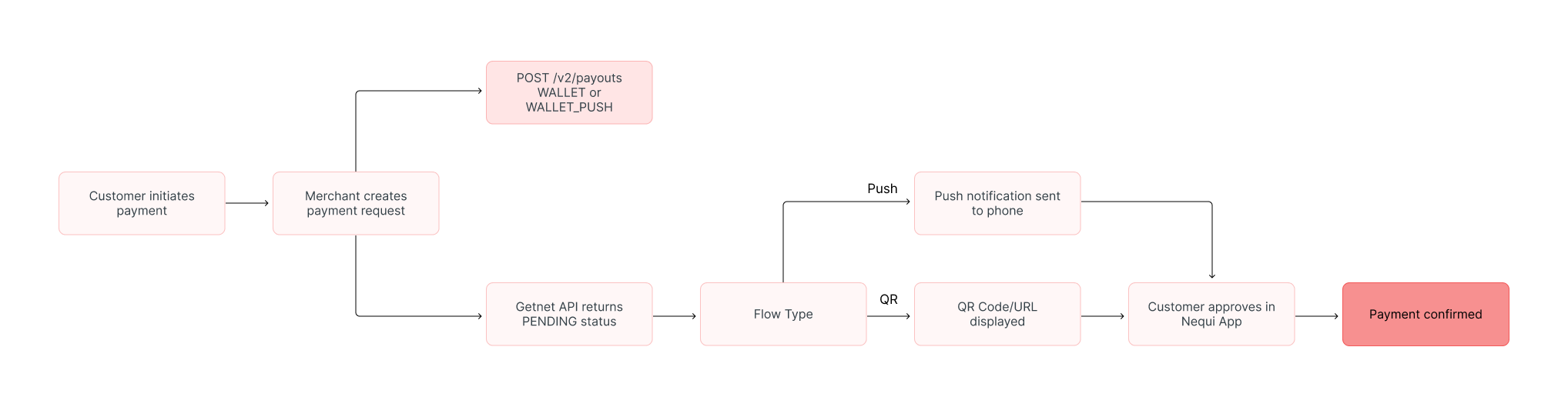
This section guides you through the complete process of implementing Nequi payments. The diagram below provides an overview of the Nequi payment process:
1. Create the payment request
To initiate a Nequi payment, call the Create - Authorize endpoint.
payment_method and provide the customer's mobile phone number (critical for the Push flow).The table outlines the minimum fields required for a Nequi payment.
| Attribute | Description | Required value |
|---|---|---|
payment_method | Defines the flow type | WALLET (for QR Code flow) or WALLET_PUSH (for Push Notification flow) |
brand | Nequi brand identifier | NEQUI |
callback_url | Where status updates are sent | Your HTTPS endpoint |
amount | Transaction amount in cents | Integer (e.g. 10000 for $100.00 COP) |
currency | ISO currency code | COP |
order_id | Merchant reference for reconciliation | Unique string (max 32 characters) |
customer.phone_number | Customer's mobile number | String (e.g., 3001234567) |
Nequi Push Notification
WALLET_PUSH. The customer receives a notification on their phone. No redirect URL is returned in the response.The following sample request shows how to initialize a Nequi push notification payment.
curl --location --request POST '[https://api.pre.globalgetnet.com/dpm/payments-gwproxy/v2/payments](https://api.pre.globalgetnet.com/dpm/payments-gwproxy/v2/payments)' \
--header 'Content-Type: application/json' \
--header 'Authorization: Bearer <ACCESS_TOKEN>' \
--data-raw '{
    "idempotency_key": "bcad559e-ae27-480c-86ff-fe6c17c762c3",
    "request_id": "894d2718-3966-4df2-b9c2-1a7ddece28ff",
    "order_id": "35541354322",
    "data": {
        "amount": 400,
        "currency": "COP",
        "customer_id": "47377104-827e-4143-b461-fdf768fb2903",
        "payment": {
            "payment_id": "42853760-f2a5-4dff-b4f2-a60689c19965",
            "payment_method": "WALLET_PUSH",
            "brand": "NEQUI",
            "soft_descriptor": "NEQUI TESTE"
        },
        "additional_data": {
            "callback_url": "https://localhost:8080/notification/fake/1",
            "customer": {
                "email": "customer@email.com",
                "document_number": "50506468",
                "document_type": "uyci",
                "name": "Jose da Silva",
                "phone_number": "34700000000",
                "billing_address": {
                    "street": "R a",
                    "number": "1",
                    "district": "B",
                    "city": "City Z",
                    "state": "SP",
                    "country": "CO",
                    "postal_code": "05781000",
                    "complement": "N/A"
                }
            },
            "order": {
                "items": [
                    {
                        "name": "Item2",
                        "quantity": 1,
                        "sku": "sku1",
                        "price": 1022
                    }
                ]
            }
        }
    }
}'curl --location --request POST '[https://api.pre.globalgetnet.com/dpm/payments-gwproxy/v2/payments](https://api.pre.globalgetnet.com/dpm/payments-gwproxy/v2/payments)' \
--header 'Content-Type: application/json' \
--header 'Authorization: Bearer <ACCESS_TOKEN>' \
--data-raw '{
"idempotency_key": "bcad559e-ae27-480c-86ff-fe6c17c762c3",
"request_id": "894d2718-3966-4df2-b9c2-1a7ddece28ff",
"order_id": "35541354322",
"data": {
"amount": 400,
"currency": "COP",
"customer_id": "47377104-827e-4143-b461-fdf768fb2903",
"payment": {
"payment_id": "42853760-f2a5-4dff-b4f2-a60689c19965",
"payment_method": "WALLET_PUSH",
"brand": "NEQUI",
"soft_descriptor": "NEQUI TESTE"
},
"additional_data": {
"callback_url": "https://localhost:8080/notification/fake/1",
"customer": {
"email": "customer@email.com",
"document_number": "50506468",
"document_type": "uyci",
"name": "Jose da Silva",
"phone_number": "34700000000",
"billing_address": {
"street": "R a",
"number": "1",
"district": "B",
"city": "City Z",
"state": "SP",
"country": "CO",
"postal_code": "05781000",
"complement": "N/A"
}
},
"order": {
"items": [
{
"name": "Item2",
"quantity": 1,
"sku": "sku1",
"price": 1022
}
]
}
}
}
}'The API responds with a payload similar to the example below.
{
  "idempotency_key": "bcad559e-ae27-480c-86ff-fe6c17c762c3",
  "seller_id": "your-seller-id",
  "payment_id": "42853760-f2a5-4dff-b4f2-a60689c19965",
  "order_id": "35541354322",
  "amount": "400",
  "currency": "COP",
  "status": "PENDING",
  "payment_method": "WALLET_PUSH",
  "received_at": "2025-11-15T10:00:00.000Z",
  "reason_code": "00",
  "reason_message": "Waiting for customer approval in Nequi app."
}{
"idempotency_key": "bcad559e-ae27-480c-86ff-fe6c17c762c3",
"seller_id": "your-seller-id",
"payment_id": "42853760-f2a5-4dff-b4f2-a60689c19965",
"order_id": "35541354322",
"amount": "400",
"currency": "COP",
"status": "PENDING",
"payment_method": "WALLET_PUSH",
"received_at": "2025-11-15T10:00:00.000Z",
"reason_code": "00",
"reason_message": "Waiting for customer approval in Nequi app."
}Nequi QR Code
WALLET. The API returns a redirect_url which allows the merchant to generate a QR code.The following sample request shows how to initialize a Nequi QR payment.
curl --location --request POST '[https://api.pre.globalgetnet.com/dpm/payments-gwproxy/v2/payments](https://api.pre.globalgetnet.com/dpm/payments-gwproxy/v2/payments)' \
--header 'Content-Type: application/json' \
--header 'Authorization: Bearer <ACCESS_TOKEN>' \
--data-raw '{
    "idempotency_key": "qr-flow-unique-key-123",
    "request_id": "qr-req-001",
    "order_id": "35541354323",
    "data": {
        "amount": 400,
        "currency": "COP",
        "customer_id": "47377104-827e-4143-b461-fdf768fb2903",
        "payment": {
            "payment_id": "55853760-f2a5-4dff-b4f2-a60689c19966",
            "payment_method": "WALLET",
            "brand": "NEQUI",
            "soft_descriptor": "NEQUI QR TEST"
        },
        "additional_data": {
            "callback_url": "https://localhost:8080/notification/fake/1",
            "customer": {
                "email": "customer@email.com",
                "document_number": "50506468",
                "document_type": "uyci",
                "name": "Jose da Silva",
                "phone_number": "34700000000",
                "billing_address": {
                    "street": "R a",
                    "number": "1",
                    "district": "B",
                    "city": "City Z",
                    "state": "SP",
                    "country": "CO",
                    "postal_code": "05781000",
                    "complement": "N/A"
                }
            }
        }
    }
}'curl --location --request POST '[https://api.pre.globalgetnet.com/dpm/payments-gwproxy/v2/payments](https://api.pre.globalgetnet.com/dpm/payments-gwproxy/v2/payments)' \
--header 'Content-Type: application/json' \
--header 'Authorization: Bearer <ACCESS_TOKEN>' \
--data-raw '{
"idempotency_key": "qr-flow-unique-key-123",
"request_id": "qr-req-001",
"order_id": "35541354323",
"data": {
"amount": 400,
"currency": "COP",
"customer_id": "47377104-827e-4143-b461-fdf768fb2903",
"payment": {
"payment_id": "55853760-f2a5-4dff-b4f2-a60689c19966",
"payment_method": "WALLET",
"brand": "NEQUI",
"soft_descriptor": "NEQUI QR TEST"
},
"additional_data": {
"callback_url": "https://localhost:8080/notification/fake/1",
"customer": {
"email": "customer@email.com",
"document_number": "50506468",
"document_type": "uyci",
"name": "Jose da Silva",
"phone_number": "34700000000",
"billing_address": {
"street": "R a",
"number": "1",
"district": "B",
"city": "City Z",
"state": "SP",
"country": "CO",
"postal_code": "05781000",
"complement": "N/A"
}
}
}
}
}'The API responds with a payload similar to the example below.
{
  "idempotency_key": "qr-flow-unique-key-123",
  "seller_id": "your-seller-id",
  "payment_id": "55853760-f2a5-4dff-b4f2-a60689c19966",
  "order_id": "35541354323",
  "amount": "400",
  "currency": "COP",
  "status": "PENDING",
  "payment_method": "WALLET",
  "received_at": "2025-11-15T10:05:00.000Z",
  "reason_code": "00",
  "reason_message": "Waiting for payment confirmation.",
  "additional_data": {
      "redirect_url": "[https://payment.nequi.com/qr/transaction-token-12345](https://payment.nequi.com/qr/transaction-token-12345)"
  }
}{
"idempotency_key": "qr-flow-unique-key-123",
"seller_id": "your-seller-id",
"payment_id": "55853760-f2a5-4dff-b4f2-a60689c19966",
"order_id": "35541354323",
"amount": "400",
"currency": "COP",
"status": "PENDING",
"payment_method": "WALLET",
"received_at": "2025-11-15T10:05:00.000Z",
"reason_code": "00",
"reason_message": "Waiting for payment confirmation.",
"additional_data": {
"redirect_url": "[https://payment.nequi.com/qr/transaction-token-12345](https://payment.nequi.com/qr/transaction-token-12345)"
}
}2. Customer Action
The customer action depends on the chosen flow:
QR Code
- The user is redirected to a page on which a QR code appears.
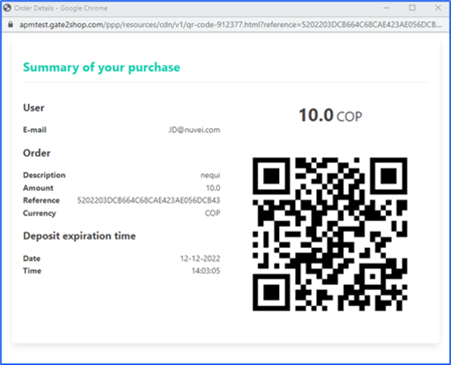
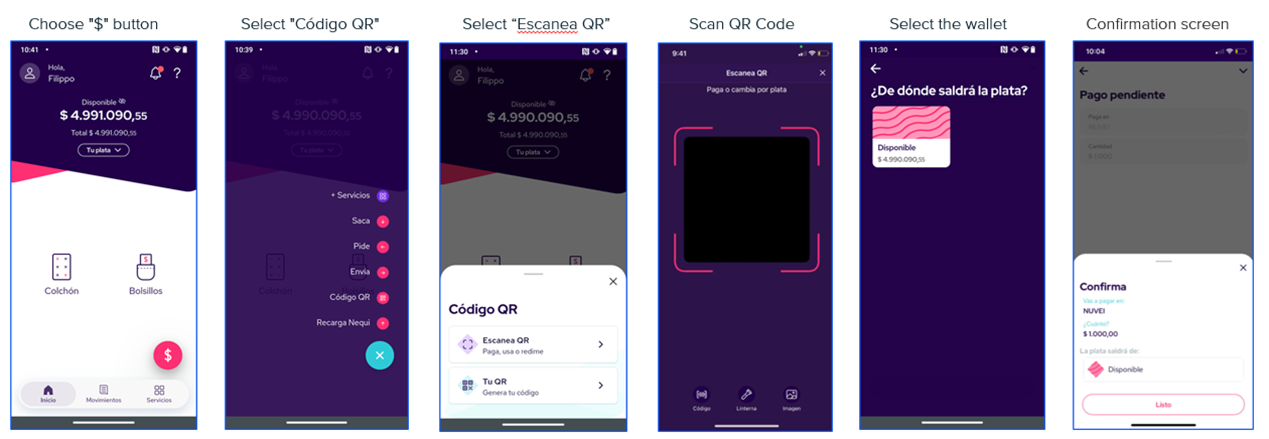
The user can either scan the QR using the Nequi mobile app or take a screenshot of the QR code and upload it to the app.
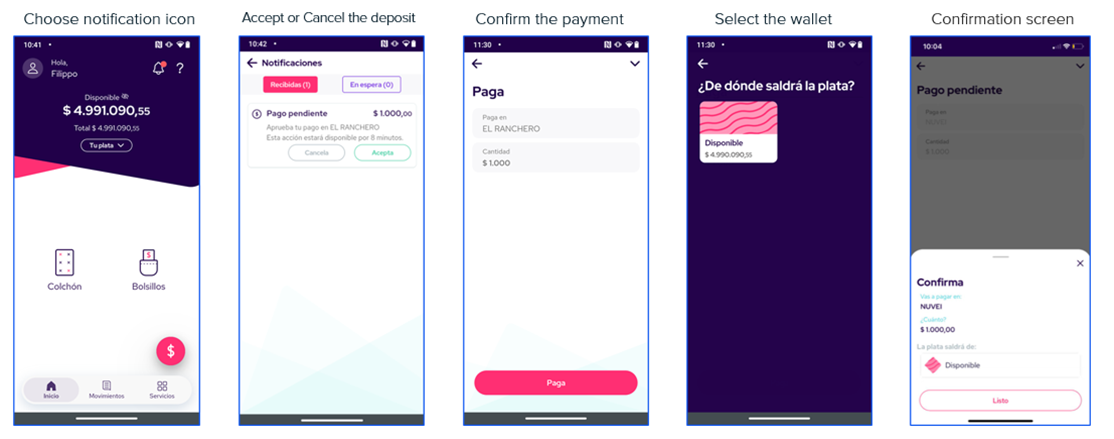
Push Notification
The user receives a push notification in the Nequi mobile app.
3. Verify payment status
callback_url with the updated status (APPROVED or REJECTED).You can also manually check the status using the Get Transaction endpoint.
Payouts
The Nequi Payout solution allows merchants to disburse funds directly to a customer's Nequi digital wallet in Colombia. This is ideal for gig economy earnings, refunds, or gaming withdrawals.
The Getnet API simplifies the underlying process into a single request. You do not need to manually register the user or token; simply provide the customer's phone number and details in the payout request.
Characteristics
The table below summarizes the behavior and requirements for Nequi Payouts.
| Capability | Details |
|---|---|
| Transaction Type | Disbursement (Merchant sends funds to Customer). |
| Confirmation | Asynchronous — A webhook notification informs the merchant when the funds have been successfully credited. |
| Data Requirements | Phone Number: Must be exactly 10 digits. Customer Details: First and Last name are required for the provider registration. |
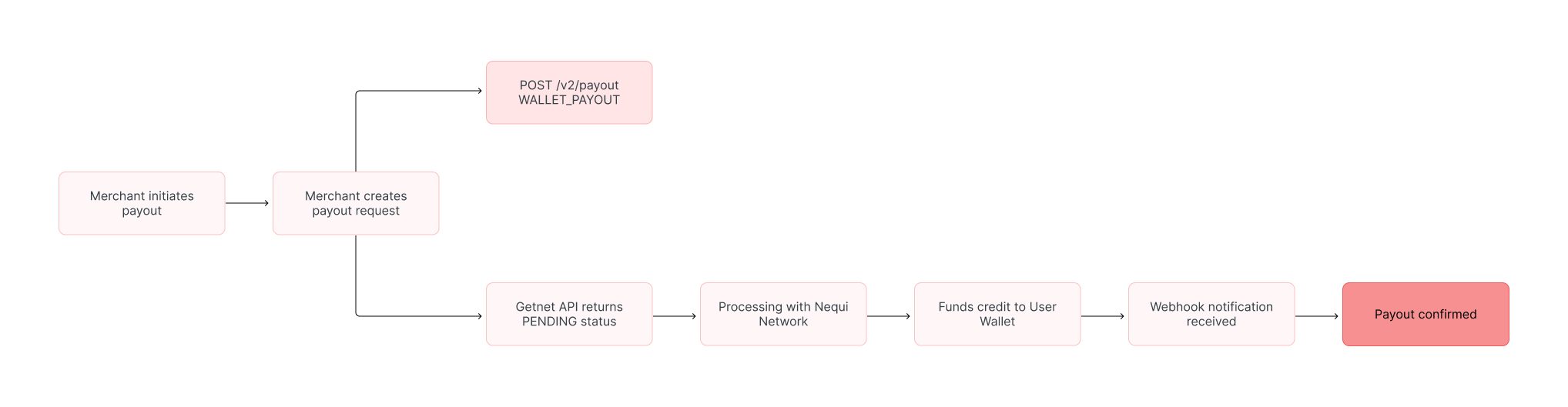
Payout flow
The diagram below illustrates the business flow for a Nequi Payout:
1. Create the payout request
payment_method as WALLET_PAYOUT and provide the customer's Nequi phone number.Important Thecustomer.phone_numberis the key identifier for the Nequi account. It must be exactly 10 digits long.

curl --location --request POST '[https://api.pre.globalgetnet.com/dpm/payments-gwproxy/v2/payouts](https://api.pre.globalgetnet.com/dpm/payments-gwproxy/v2/payouts)' \
--header 'Content-Type: application/json' \
--header 'x-seller-id: your-seller-id' \
--header 'country: CO' \
--header 'Authorization: Bearer <ACCESS_TOKEN>' \
--data-raw '{
    "idempotency_key": "payout-unique-key-001",
    "request_id": "req-payout-001",
    "order_id": "payout-ref-12345",
    "data": {
        "amount": 50000,
        "currency": "COP",
        "customer_id": "cust-001",
        "payment": {
            "payment_method": "WALLET_PAYOUT",
            "brand": "NEQUI",
            "soft_descriptor": "PAYOUT MERCHANT"
        },
        "additional_data": {
            "callback_url": "[https://your-domain.com/webhook/payouts](https://your-domain.com/webhook/payouts)",
            "customer": {
                "phone_number": "3001234567",
                "email": "john.smith@email.com",
                "document_number": "12345678",
                "document_type": "CC",
                "first_name": "John",
                "last_name": "Smith"
            }
        }
    }
}'curl --location --request POST '[https://api.pre.globalgetnet.com/dpm/payments-gwproxy/v2/payouts](https://api.pre.globalgetnet.com/dpm/payments-gwproxy/v2/payouts)' \
--header 'Content-Type: application/json' \
--header 'x-seller-id: your-seller-id' \
--header 'country: CO' \
--header 'Authorization: Bearer <ACCESS_TOKEN>' \
--data-raw '{
"idempotency_key": "payout-unique-key-001",
"request_id": "req-payout-001",
"order_id": "payout-ref-12345",
"data": {
"amount": 50000,
"currency": "COP",
"customer_id": "cust-001",
"payment": {
"payment_method": "WALLET_PAYOUT",
"brand": "NEQUI",
"soft_descriptor": "PAYOUT MERCHANT"
},
"additional_data": {
"callback_url": "[https://your-domain.com/webhook/payouts](https://your-domain.com/webhook/payouts)",
"customer": {
"phone_number": "3001234567",
"email": "john.smith@email.com",
"document_number": "12345678",
"document_type": "CC",
"first_name": "John",
"last_name": "Smith"
}
}
}
}'{
"idempotency_key": "payout-unique-key-001",
"seller_id": "your-seller-id",
"payment_id": "payout-nequi-998877",
"order_id": "payout-ref-12345",
"amount": "50000",
"currency": "COP",
"status": "PENDING",
"payment_method": "WALLET_PAYOUT",
"received_at": "2025-11-20T14:30:00.000Z",
"reason_code": "00",
"reason_message": "Payout request accepted. Processing funds transfer."
}{
"idempotency_key": "payout-unique-key-001",
"seller_id": "your-seller-id",
"payment_id": "payout-nequi-998877",
"order_id": "payout-ref-12345",
"amount": "50000",
"currency": "COP",
"status": "PENDING",
"payment_method": "WALLET_PAYOUT",
"received_at": "2025-11-20T14:30:00.000Z",
"reason_code": "00",
"reason_message": "Payout request accepted. Processing funds transfer."
}2. Verify payout status
callback_url.APPROVED: The funds are now available in the customer's Nequi account.DECLINED: The payout failed (Invalid phone number, account inactive, or monthly limits exceeded).
Refunds and cancellations
Nequi payments support refunds:
- Refunds: Available for settled transactions. You can perform full or partial refunds.
- Cancellations: If a payment is still in a
PENDINGstate (e.g., customer hasn't accepted the push yet), it may be cancellable depending on the specific provider timeout, but typically Nequi transactions are either approved or expire.
To process a refund, follow the instructions in the Refund a Payment guide.
Read more
- Review Authentication for token management and security best practices.
On this page